
In August I spent an evening migrating my UDM Pro from the legacy firewall to the zone-based firewall, and I isolated my IoT VLAN in the same maintenance window. I wrote about the morning after in Get-NetNeighbor: The Cmdlet You Underuse, because what broke was a Windows neighbor cache and had little to do with the firewall. The firewall itself got a quick look that week, and then I left it alone for two months.
I was planning on doing some updates to the network that night and saw the new features, figured I might as well migrate at the same time.
This post is the firewall half. On October 20 I sat down to plan a few posts about the network, pulled every firewall policy out of the controller, and read them in order. Everything still worked, and most of it did what I meant it to. A handful of rules didn’t, and none of them had ever announced themselves. A firewall rule that’s too broad doesn’t produce errors. Traffic just keeps flowing.
The gateway is a UDM Pro I named Megumin (my network names are Konosuba themed, what a weeb), running UniFi OS 5.1.31 with the Network application at 10.6.106. The networks are a Default LAN on 192.168.66.0/24, an IoT/Guest VLAN on 192.168.1.0/24, and a third household network on 192.168.0.0/24 that stays out of my Pi-hole setup.
Zones, briefly
UniFi Network 9.0 replaced the old rule chains (LAN In, LAN Out, WAN In and the rest) with zones. You put networks into zones, and policies describe traffic from one zone to another. The built-in zones are Internal, External, Gateway, VPN, Hotspot and DMZ. External holds your WAN connections, Gateway is the UDM itself (its DHCP, DNS and admin interface), and Internal is where your own networks go.
Every pair of zones has a default behavior, and the controller draws it as a matrix:
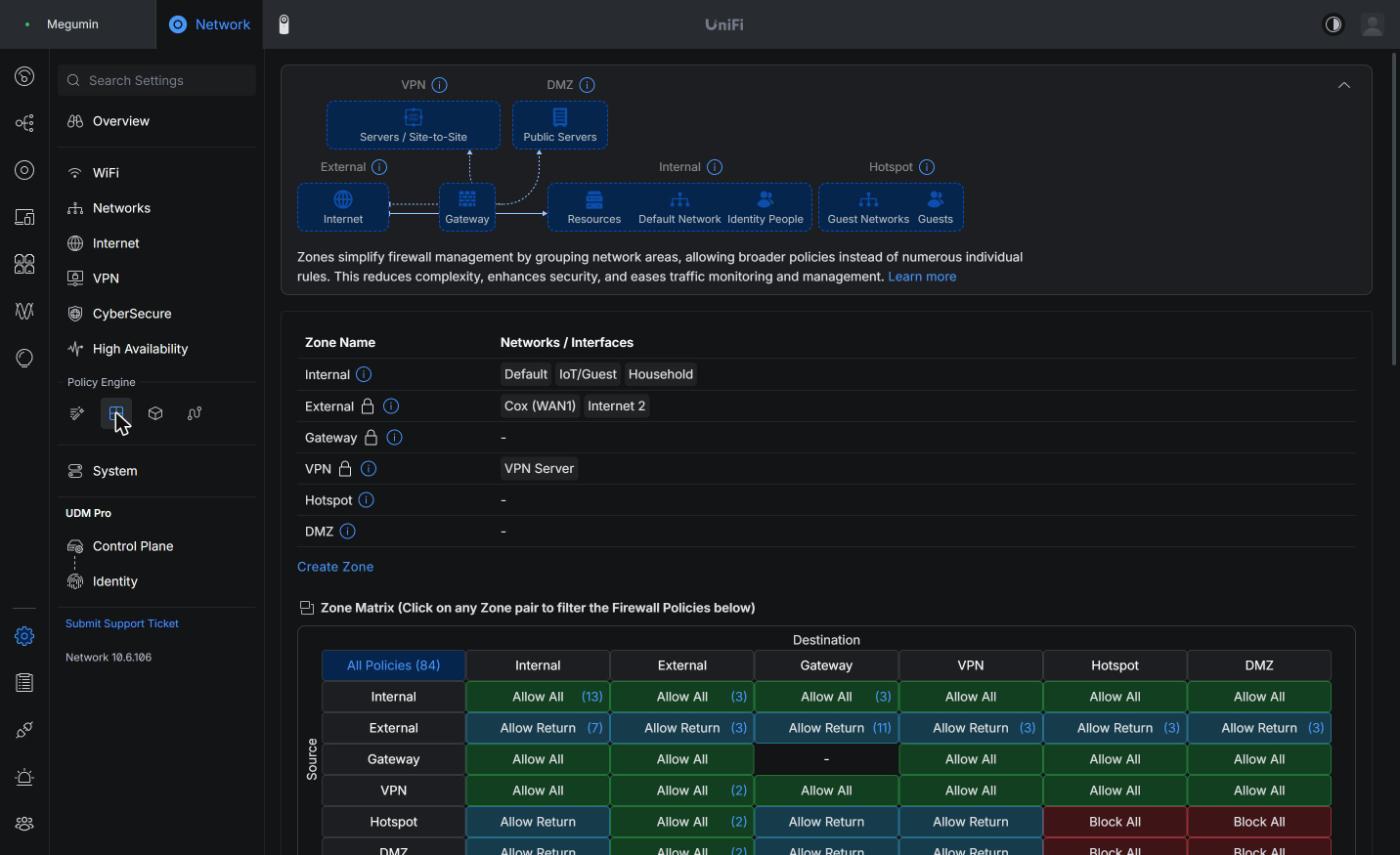
(I’ve relabeled the third network as “Household” in this screenshot.)
On a home network these cells decide most of it: Internal to Internal is Allow All. Internal to Gateway is Allow All. External to Internal is Allow Return, so the internet can answer connections you started and can’t start its own except through a port forward. Hotspot to Internal is also Allow Return, and Hotspot to Hotspot is Block All.
Hotspot is the zone UniFi intends for guest networks, and its defaults are already isolated. A network only lands there if you created it as a guest network. Mine was created years ago as an ordinary VLAN that happens to be called IoT/Guest, so the migration put it in Internal next to the Default LAN, along with the household network. Inside Internal, everything can reach everything until a policy says otherwise.
That one placement decides how the rest of this works. With all three networks in one zone, isolation has to come from policies inside the Internal to Internal pair, and from the order those policies sit in.
What the migration does with old rules
The legacy firewall organized rules by where traffic entered and left the gateway. LAN In, LAN Out and LAN Local covered your own networks. Guest networks had the same set, and so did the WAN. The migration maps each of those rule sets onto a source and destination zone pair. Rules that applied to your LANs come out with Internal as the source, guest rules come out of Hotspot, and WAN rules come out of External. As I read the mapping, the “Local” variants, which covered traffic to the gateway itself, end up pointed at the Gateway zone.
Ubiquiti says the result is functionally the same as what you had, and that the conversion can create extra policies that do nothing. Both of those were true for me. The firewall side worked on the night, as a migration should. That’s also why I didn’t go back and read the output closely.
Keeping IoT/Guest in Internal
Moving IoT/Guest into the Hotspot zone would have handed me most of the isolation through the matrix itself. Hotspot to Internal is Allow Return, so devices on that VLAN couldn’t start a connection to the Default LAN without an explicit allow, and the protection wouldn’t depend on a block rule sitting in the right place. Internal to Hotspot is Allow All, so the Default LAN could still start connections into the VLAN without a rule.
The exceptions would still need writing. Plex, the printer and Pi-hole would each become a Hotspot to Internal allow. And Hotspot to Gateway is Allow Return in the matrix, so anything an IoT device needs from the gateway itself has to come from a predefined policy or a new allow, which is a different set of things to test.
Hotspot has no lock icon on the zones page, unlike External, Gateway and VPN, so as far as I can tell a network can be moved into it. I haven’t done it. Everything below keeps all three networks in Internal and does the isolation with ordered policies.
I wanted to keep my IoT/Guest instead of trying the Hotspot, no true design goals there. Just trying to limit as many changes in the migration as possible, as I’ve several other automations that I didn’t want to break.
How policies are ordered
Each zone pair keeps its own list. On my controller, policies I create start at index 10000 and count up within their pair. The built-in policies UniFi generates (port forward allows, return traffic, the final Block All) sit at 30000 and above, so anything I write comes before them. The first policy that matches a packet decides it.
A block placed above an allow wins, even when the allow is more specific, and that showed up in my audit. The policy table in the UI sorts by name by default, which hides the evaluation order. The table also truncates long values, so a destination list with several ports turns into 161,515,....
Pulling the list out of the controller
To read the policies in evaluation order without truncation, I went to the API the web UI itself uses. If you’re signed in to the controller in a browser, the session cookie is enough for read-only requests, and the developer console can do the rest. This is the shape of what I ran:
| |
firewall/zone returns each zone with the networks it contains, and firewall-policies returns every policy, user-created and predefined, with an index, a predefined flag, and full source and destination objects. Filtering out the predefined ones leaves only the rules I’m responsible for. Sorting by index gives the order the gateway evaluates them in. Each policy also carries a hits counter, the same number the UI’s Hits column shows. I ended up leaning on that field more than any other.
/proxy/network/v2/api/site/default/nat lists NAT rules the same way, and /proxy/network/api/s/default/rest/networkconf returns the networks with their DHCP DNS settings. Every one of those requests is a GET, so the snippet only reads.
This is “plex services1” as the API returns it, after the fix described further down and trimmed to the fields this post uses:
| |
source.zone_id and destination.zone_id are what put a policy into a zone pair, and index is its place in that pair’s list. matching_target says what kind of match each side uses: ANY, IP, NETWORK and a few others. connection_state_type and create_allow_respond map to the Connection State and “Auto Allow Return Traffic” options in the editor, and one of them is behind the ICMP rule I had to fix twice. Before the fix, this rule’s destination was "matching_target": "ANY" with "port_matching_type": "ANY" and "protocol": "all". A policy reading “any” on every field of the destination is the first thing I’d look for in anyone’s export.
What the list said
User policies in the Internal to Internal pair, in index order, as I found them:
| Index | Action | Name | Source | Destination |
|---|---|---|---|---|
| 10000 | Allow | plex | IoT/Guest | 192.168.66.19, port 32400, all protocols |
| 10001 | Allow | guest to plex | IoT/Guest | 192.168.66.19 and .5, all protocols |
| 10002 | Allow | plex to guest | 192.168.66.19 | IoT/Guest |
| 10003 | Allow | IoT to Pi-hole DNS | IoT/Guest | 192.168.66.2, port 53 |
| 10004 | Allow | iot to printer | IoT/Guest | 192.168.66.100, five printer ports |
| 10005 | Block | block iot to lan | IoT/Guest | Default, all protocols |
| 10006 | Allow | (no name) | Default and IoT/Guest | Internal, anything |
| 10007 | Allow | (no name) | Internal, anything | Default and IoT/Guest |
| 10008 | Allow | IoT to Pi-hole ICMP | IoT/Guest | 192.168.66.2, echo request |
And in the External to Internal pair:
| Index | Action | Name | Source | Destination |
|---|---|---|---|---|
| 10000 | Allow | plex services1 | 46.51.207.89 | Internal, anything, all protocols |
| 10001 | Allow | plex services2 | 54.170.120.91 | Internal, anything, all protocols |
There were no user policies at all from Internal to Gateway or from Internal to External.
The shape is right. IoT/Guest gets a short list of specific allows, then a block for everything else headed to the Default LAN. Inside that shape, the details had drifted.
Rules with no names
Two allows had no name and no description. One let Default and IoT/Guest reach anything in Internal; the other let anything in Internal reach Default and IoT/Guest. Ubiquiti’s migration notes say the conversion “may generate a variety of rules that are redundant or otherwise have no impact,” and unnamed rules covering whole networks are what I’d expect a converted rule set to produce. I can’t prove that’s where these came from, though. The controller doesn’t record where a policy came from.
What they did is easier to pin down. Internal to Internal is already Allow All, so a broad allow inside that pair changes little for most traffic. For IoT/Guest to Default specifically, “block iot to lan” sits above them at 10005 and wins. That leaves one real effect: Default starting connections into IoT/Guest, which I want for casting to the TV and for Home Assistant talking to devices on that VLAN.
I kept both and named them for what they do: “allow Default and IoT/Guest to Internal” and “allow Internal to Default and IoT/Guest.” The first one’s description now says that IoT/Guest to Default never reaches it because the block is above it. A rule that can’t match its most dangerous case should say so, or whoever reads the list next has to work it out again.
One of the reasons I started a private repo with YAML-style annotations is to provide justification for rules that the UI doesn’t give me a field for. It saves me from wondering later why I implemented a thing.
Rules pointing at the wrong machine
The first three rules aimed at 192.168.66.19. Plex used to answer there. It’s been a VM at 192.168.66.5 for a while now, and .19 belongs to ms01a, a mini PC that runs my Pi-hole container and a FreeIPA replica.
So “plex” allowed IoT/Guest to reach port 32400 on a machine that isn’t Plex, and “plex to guest” let that same machine start connections into the IoT VLAN. Plex kept working from the TV only because “guest to plex” happened to list both addresses.
Rules that match by IP keep whatever meaning the address had when you wrote them. When a machine moves, the rule stays with the address, and the firewall has no way to know that .19 changed hands. I updated all three to .5.
UniFi has better options than a bare IP. A fixed address or DHCP reservation for the server keeps destination rules pointed at it, and for sources, a policy can match by device or MAC address so the rule follows the hardware.
Two internet-facing rules scoped to everything
“plex services1” and “plex services2” allowed two fixed public addresses from External to Internal, any destination, all protocols. I don’t know who those addresses belong to today. The rule names suggest something Plex-related from an older setup, and a search didn’t turn up a confirmed owner, so I’m leaving them unnamed here.
A packet from the internet arrives addressed to my WAN address, and the only way it reaches a machine on the LAN is a port forward translating it. In practice, “Internal, anything” covered whatever I forward: Plex on 32400 and a Minecraft server on 25565. That’s wider than any Plex check needs.
They were also redundant. When you create a port forward, UniFi generates a predefined allow for it in the External to Internal pair. Mine is “Allow Port Forward Plex” at index 30000, and it already admits any source to the forward. The Hits column showed a dash for both “plex services” rules. Neither had matched anything the counters had recorded.
I narrowed both to 192.168.66.5, TCP 32400, which is everything a Plex reachability check could want. Deleting them would also be correct. I kept them narrowed so the record of why they existed stays in the list, and the hits counter will tell me if either address ever shows up.
I made that change through the same API, partly to keep the before and after in one place. Writes need the CSRF token the controller hands back in a response header. I sent the full policy object back with only the fields I meant to change, so nothing else on the rule could drift:
| |
I kept a copy of the original destination before sending it, so putting the old rule back would be one more PUT. The editor in the UI does the same thing with more clicking, and for a single rule it’s the better choice. The API is the better fit when you’re changing several rules and want to read them back in index order straight afterward.
The hits column
I got more out of the counters than out of any other part of the page. A few values from the same afternoon, after the fixes:
| Policy | Hits |
|---|---|
| block iot to lan | 35,370,967 |
| guest to plex | 51,612,145 |
| IoT to Pi-hole DNS | 9,644,249 |
| iot to printer | 929 |
| plex | 4 |
| plex services1 and 2 | none |
“plex” at 4 is the rule that pointed at .19 until that afternoon. I don’t know whether editing a rule resets its counter, so I won’t read too much into the exact number, but “guest to plex” listed .5 all along and carried the Plex traffic the first rule should have. The 35 million hits on “block iot to lan” are the IoT VLAN constantly trying to talk to the Default LAN: discovery broadcasts, devices looking for things they used to see, and whatever else smart TVs do when nobody is watching.
A rule with no hits is either dead weight or a guard that hasn’t been tested yet. A rule with a handful of hits next to a sibling with tens of millions usually means one of them is aimed at the wrong place.
By the way, the 35 million is mostly my Samsung monitor (Odyssey Ark fwiw) snooping on everything else in my network. I don’t even use your stupid monitor OS Samsung, it’s just a DisplayPort in. You creep.
Checking your own
If you migrated a UniFi gateway and haven’t looked since, these are the patterns that turned up in mine, and how each one shows itself:
| Look for | How it shows up |
|---|---|
| Policies with no name | blank Name column, or name missing in the API |
| IP targets for machines that have moved | low hits next to a sibling rule with high hits |
| External allows scoped to Internal, anything | destination matching_target of ANY on an External source |
| Rules duplicated by a port forward | a predefined “Allow Port Forward” covering the same service |
| Allows that sit below a block | a specific allow with a higher index than a broad block in the same pair |
| Rules that have never matched | a dash in the Hits column |
Read the last two together, with one caution. My ICMP rule sat below the block and still showed 4.8 million hits while it wasn’t letting a single new ping through. A hit count tells you a rule matched something. Only a test tells you it matched what you wrote it for.
After
The Internal to Internal pair now reads:
| Index | Action | Name |
|---|---|---|
| 10000 | Allow | plex (IoT/Guest to .5:32400) |
| 10001 | Allow | guest to plex (IoT/Guest to .5) |
| 10002 | Allow | plex to guest (.5 to IoT/Guest) |
| 10003 | Allow | IoT to Pi-hole DNS |
| 10004 | Allow | iot to printer |
| 10005 | Allow | IoT to Pi-hole ICMP |
| 10006 | Block | block iot to lan |
| 10007 | Allow | allow Default and IoT/Guest to Internal |
| 10008 | Allow | allow Internal to Default and IoT/Guest |
Two new blocks sit in other zone pairs. IoT/Guest can no longer reach anything on the internet over port 853, and it can no longer reach the gateway’s web interface. And the ICMP rule moved, for reasons that took two attempts to get right. Those changes belong to the isolation and DNS sides of this network, so they get their own write-ups.
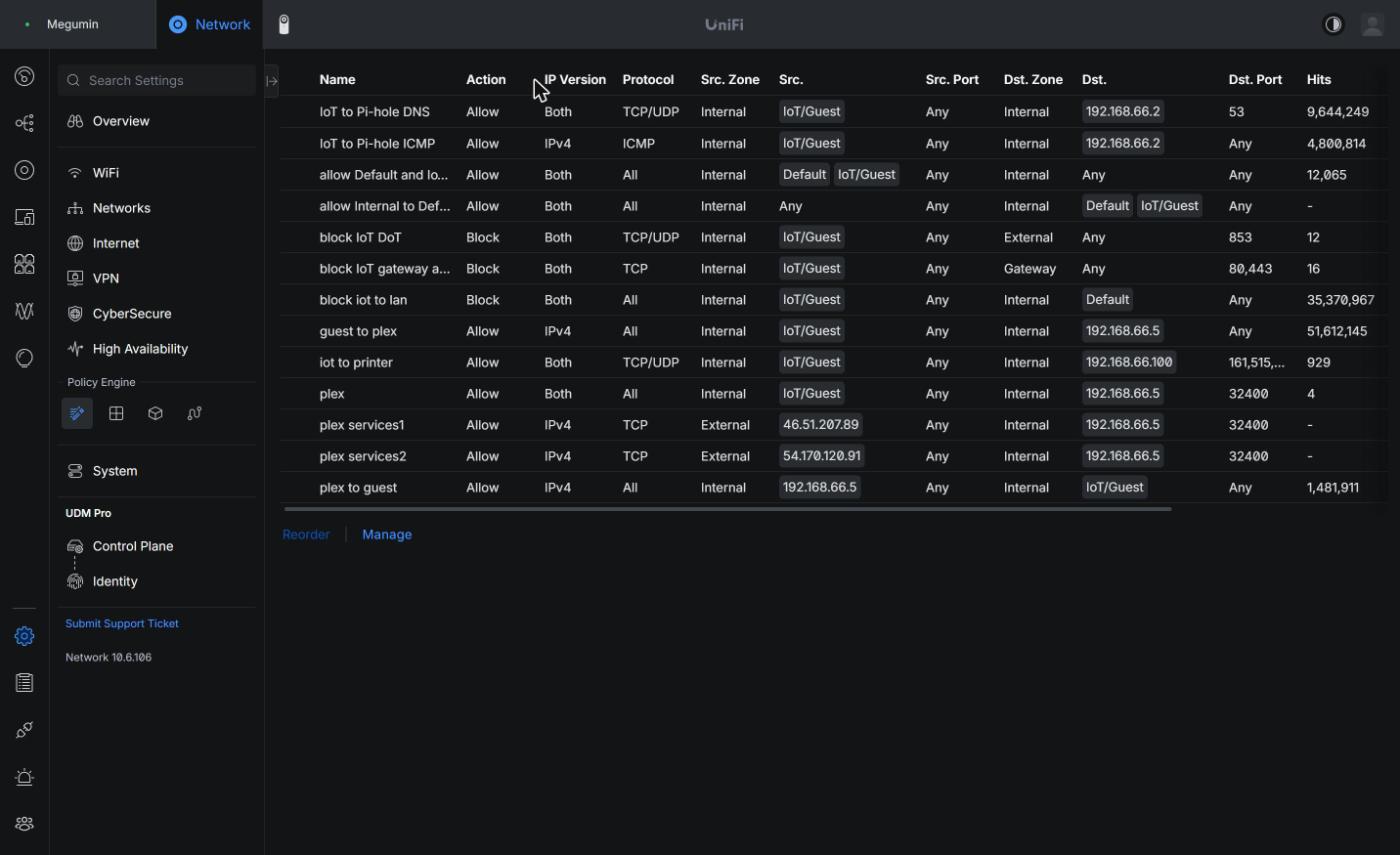
I tested every change from inside the IoT VLAN before calling it done. That method gets its own section in the isolation post, since it’s the only way I found to prove what an IoT device can and can’t reach without trusting the UI.
Writing it down somewhere else
UniFi owns its own configuration, and the controller has no field for why a policy exists. My homelab repo keeps an inventory file for every host, and the gateway’s entry now carries the full policy list in evaluation order, the reason behind each change, and the test results. The controller holds the rules. The repo holds why they’re there, plus the before list above, since the controller keeps no history of what a policy used to say.
References
- UniFi zone-based firewall, Ubiquiti Help Center
- UniFi Zone-Based Firewall, LazyAdmin
- UniFi zone-based firewall changes the IoT VLAN rule, vNinja