
The default answer, when I decided the lab needed a real directory, was a Windows Server VM promoted to a domain controller. I didn’t want it, and none of the reasons had anything to do with Active Directory being bad at its job.
The lab is Proxmox, Debian, Ubuntu, Rocky, and a NAS running OpenMediaVault. There’s no Windows in it anywhere. Adding a domain controller means adding the only Windows box in the estate and then keeping it: patching it, backing it up, and remembering how its console works six months after the last time I opened it. Evaluation media makes that worse. Windows Server evaluation runs 180 days from install, and slmgr /rearm resets the counter, but the number of resets you get depends on the release. Older evaluation builds shipped with six rearms, enough for roughly three years. Reports on Server 2025 put it at one. Either way there is a clock on the lab, and the way you find out the clock expired is a domain controller that starts shutting itself down hourly on a Saturday.
The other reason is plainer. I work with Okta, Entra ID and Ping Identity professionally, and all three sit above the layer I wanted to get at. When a Linux host authenticates a user, SSSD is doing the work, and I have only ever seen SSSD from the client side, configured by somebody else’s directory. FreeIPA is the server end of that same conversation. Running it puts the Kerberos KDC, the LDAP directory, the CA and the DNS in my hands, where I can break them on purpose.
So: FreeIPA, realm HOMELABDOMAIN.XYZ, domain homelabdomain.xyz, primary on a Dell Wyse 5070 at 192.168.66.16 running Rocky Linux 10.2 with ipa-server 4.13.1, and a replica elsewhere on the network. This post covers the decisions and the server install, which is largely a DNS migration wearing a directory costume. Hardening, client enrollment and the replica come after.
What FreeIPA is made of
FreeIPA is the upstream project for Red Hat Identity Management, so it’s the same software you get under a RHEL subscription, minus the support contract and the Red Hat documentation set. Installing it doesn’t start one daemon. It assembles several, and each of them maps onto something Active Directory does inside a single product.
| Active Directory | FreeIPA |
|---|---|
| Directory store (NTDS) | 389 Directory Server |
| Built-in KDC | MIT Kerberos |
| AD Certificate Services | Dogtag PKI |
| AD-integrated DNS | BIND with the bind-dyndb-ldap backend |
| Domain join | ipa-client-install, then SSSD |
| GPO, for the parts that apply to Linux | HBAC rules, sudo rules, SELinux user maps, automount maps |
The mapping is close enough that AD habits transfer and different enough that they occasionally mislead you. Both give you a Kerberos realm, a replicated LDAP directory, an internal CA and DNS that knows about its own SRV records. Both are administered by a single tool, ipa in this case, with a beta web UI landing in 4.13 alongside the classic one.
One naming convention carries over from Kerberos and catches people who came in through AD. The realm is uppercase, the DNS domain is lowercase, and they should be the same string in different cases. HOMELABDOMAIN.XYZ is the realm, homelabdomain.xyz is the domain, and a Kerberos principal reads fadwen@HOMELABDOMAIN.XYZ. Diverging the two is legal and every piece of documentation you will later read assumes you did not.
The Kerberos side is also why the DNS decision arrives so early. Clients locate the KDC through SRV records under _kerberos._udp and _ldap._tcp, and something has to serve those. With the integrated DNS install, ipa-server-install writes them and ipa-client-install finds them. Without it, you write them by hand in whatever resolver you already run, and you keep writing them every time the topology changes.
What differs is that the parts stay visible. A stuck replication problem is a 389-ds replication agreement you debug with ldapmodify against cn=config. A ticket that won’t issue is MIT Kerberos, and the error text comes from MIT Kerberos. Nothing sits behind a management console that translates the failure into a friendlier version of itself, which cuts both ways: the errors are exact and they’re also raw.
Where FreeIPA stops
Saying this up front saves somebody a weekend.
There’s no Windows client. Nothing corresponds to ipa-client-install on that platform, and nothing resembles the machine account and Group Policy relationship that makes AD what it is on the desktop. The supported way to have Windows machines and a FreeIPA realm in the same estate is a cross-forest trust, and that requires an Active Directory to trust. That puts the Windows Server box back on the table. If you have Windows clients to manage, you want AD, and no amount of enthusiasm for open directories changes that.
There’s also no Group Policy in the general sense. HBAC rules, sudo rules and SELinux user maps cover the slice of GPO that ever applied to Linux hosts, and they cover it well. Nothing there configures a desktop.
Service identity is thinner than the AD equivalent. There’s no gMSA analog for POSIX service accounts: an IPA service principal is a Kerberos identity with a keytab, not a POSIX user with a machine-rotated password. That distinction shapes decisions later in the build, when a container service needs to reach an NFS share.
Ruling out the alternatives
Samba’s AD DC mode is the obvious competitor and it deserves a fair hearing, because it gives you a genuine Active Directory: real GPO, real Windows domain join, real AD schema. The cost shows up in multi-DC deployments. Samba doesn’t implement DFS-R, so SysVol content doesn’t replicate between controllers, and the documented answers are rsync, unison or robocopy on a cron job with one controller nominated as the write master. Running two directory servers where the policy store syncs by scheduled file copy is a strange place to end up voluntarily. It also puts me back inside the AD model, the thing I wanted to step outside of.
OpenLDAP, or 389-ds on its own, is a directory and only a directory. You supply the KDC, the CA, the DNS integration, the password policy enforcement, the host-based access control and the tooling to manage all of it. That assembly is precisely what FreeIPA is.
authentik already runs in this lab and handles web SSO for everything with an OIDC or SAML endpoint, and it doesn’t solve this problem. An LDAP outpost isn’t a KDC. Nothing in authentik gives a host a POSIX uid, serves an ssh key to sss_ssh_authorizedkeys, or hands sudo a rule from the directory. The two systems answer different questions. That’s why they currently coexist here as two identities for one person, an unresolved item I will come back to.
Decisions that came before the install
Some of this was settled before any package was installed, and each decision constrains everything after it.
The server has to be RHEL family
freeipa-server isn’t packaged for Debian or Ubuntu, and hasn’t been for years:
| |
Ubuntu ships the FreeIPA source package and builds only the client side from it. On 26.04 the binaries produced are freeipa-client, freeipa-client-epn, freeipa-client-samba, freeipa-common, python3-ipaclient and python3-ipalib. Nothing from the server side is built. The Launchpad bug asking for a server package has been open and triaged as wishlist since 2020. The primary therefore runs Rocky 10, and the replica, which had to live on an Ubuntu host, runs as a container from a RHEL-based image.
Keeping the directory off the hypervisor
Proxmox in this lab authenticates through authentik over OIDC. Putting the directory on Proxmox creates a loop where recovering the hypervisor requires the hypervisor to already be up, and you discover that kind of dependency at the worst possible time. The primary is therefore bare metal: a Dell Wyse 5070 thin client that was sitting on a shelf doing nothing and is more than enough machine for a directory serving a house.
IPA owns the zone internally
FreeIPA can be installed without its integrated DNS, pointing at whatever resolver you already run. I chose the DNS-integrated install so host records, SRV records and reverse lookups live in one place and ipa-client-install creates them for me at enrollment time. That choice costs a chunk of setup work, described below, and it’s the part of this build that took the longest by a wide margin.
Installing the server
The prerequisites are unglamorous and every one of them causes a failure if skipped.
| |
The hostname line is the one people skip. IPA derives the host principal from the fully qualified name at install time, and correcting it afterwards is a reinstall.
Credentials get generated on the host, into a file only root can read, and never through an interactive prompt in a terminal I might later paste from. A password that has appeared in a transcript should be treated as disclosed, whatever the transcript was for:
Then the install itself:
| |
--allow-zone-overlap is required here because homelabdomain.xyz already resolves publicly, and it’s a real domain I own with real records in Cloudflare. Without the flag the installer refuses to create a zone that already exists in public DNS, on the reasonable assumption that you have made a mistake. Here the overlap is intended: it’s the split-horizon design.
The forwarders are public resolvers, and pointing them at Pi-hole would have been the intuitive choice, since Pi-hole is the resolver everything else on the network uses. That’s the wrong choice. Pi-hole is about to be configured to conditionally forward homelabdomain.xyz to this server. Pointing this server’s forwarders back at Pi-hole builds a query loop for any name IPA doesn’t hold. Public resolvers break the cycle.
--no-ntp leaves the existing chrony configuration alone. IPA will happily rewrite your time configuration during install, and if chrony is already synced and correct, letting it do so gains nothing.
What the installer leaves running
The install takes a while and prints a great deal. When it finishes, look at what is now running, because that list explains most of FreeIPA’s operational behavior:
| |
| |
Nine services, and ipactl is the supervisor over the top of them, because starting them in the wrong order doesn’t work. 389-ds has to be up before the KDC, since the KDC reads its principals out of the directory. named reads its zones out of the same directory through bind-dyndb-ldap, so a directory that won’t start takes DNS down with it. On a host that is also the DNS server for the domain it lives in, that dependency is the first thing to reach for when the whole machine appears to have gone quiet.
pki-tomcatd is Dogtag, the CA. It issues the certificates for the other services here and will issue certificates to enrolled hosts and services on request, with renewal handled by certmonger on each machine. Running an internal CA that renews things without being asked is one of the better arguments for a directory in a homelab, and it’s also a component with its own failure modes. Those show up later in the series when I get to the replica.
Confirm the realm works before touching anything else:
A ticket for admin@HOMELABDOMAIN.XYZ with a sane expiry means the KDC, the directory and the clock all agree with each other.
Owning the zone means owning all of it
This took me longest to internalize. Once IPA is authoritative for homelabdomain.xyz on the LAN, it must answer for every name any client resolves in that domain, including names that used to come from public DNS. Anything the zone doesn’t hold returns NXDOMAIN, a definitive “does not exist” rather than a fallthrough to something upstream.
That meant merging two sources into the new zone before cutting anything over.
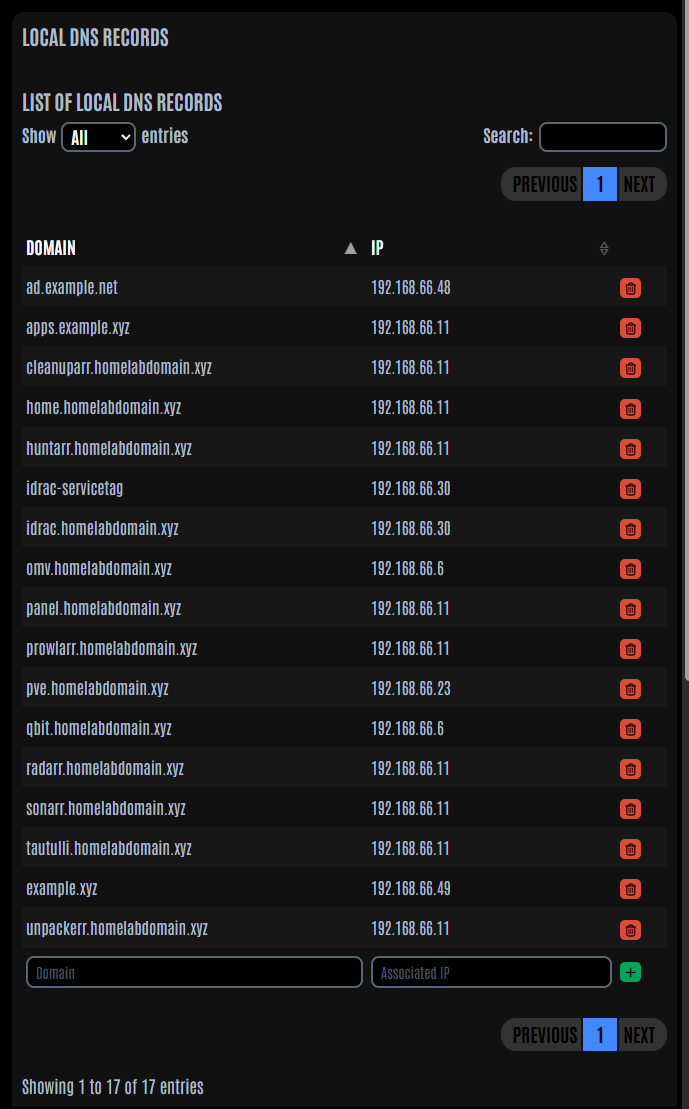
Internal records came out of Pi-hole, where thirteen A records lived as local DNS entries. Enumerating them from the Pi-hole v6 API, having learned not to trust my memory of what was in there, turned up an idrac.homelabdomain.xyz I have no recollection of creating. I do own an iDRAC.
| |
Public records came from the Cloudflare API, read directly out of the live zone. Working from memory here would have lost mail, because the zone carries Proton MX records plus SPF, DKIM and DMARC.
TXT records get split on spaces
Mail authentication broke first, and it broke in a way that looks fine from inside IPA.
| |
That stores three separate character-strings, because the value contains spaces and ipa splits on them. RFC 7208 section 3.3 says that when a TXT record contains multiple character-strings, the record is treated as those strings concatenated together with no spaces added. The record a receiving mail server evaluates is v=spf1include:alias.proton.me~all, which isn’t an SPF record at all. Same failure for DMARC. ipa dnsrecord-show displays the value looking approximately correct, and the SPF validator returns a syntax error with no obvious connection to how the record was created.
Pass the value with embedded quotes so it’s stored as a single string:
| |
Then confirm with dig +short TXT homelabdomain.xyz that one quoted string comes back rather than three.
Names behind the Cloudflare proxy cannot be copied
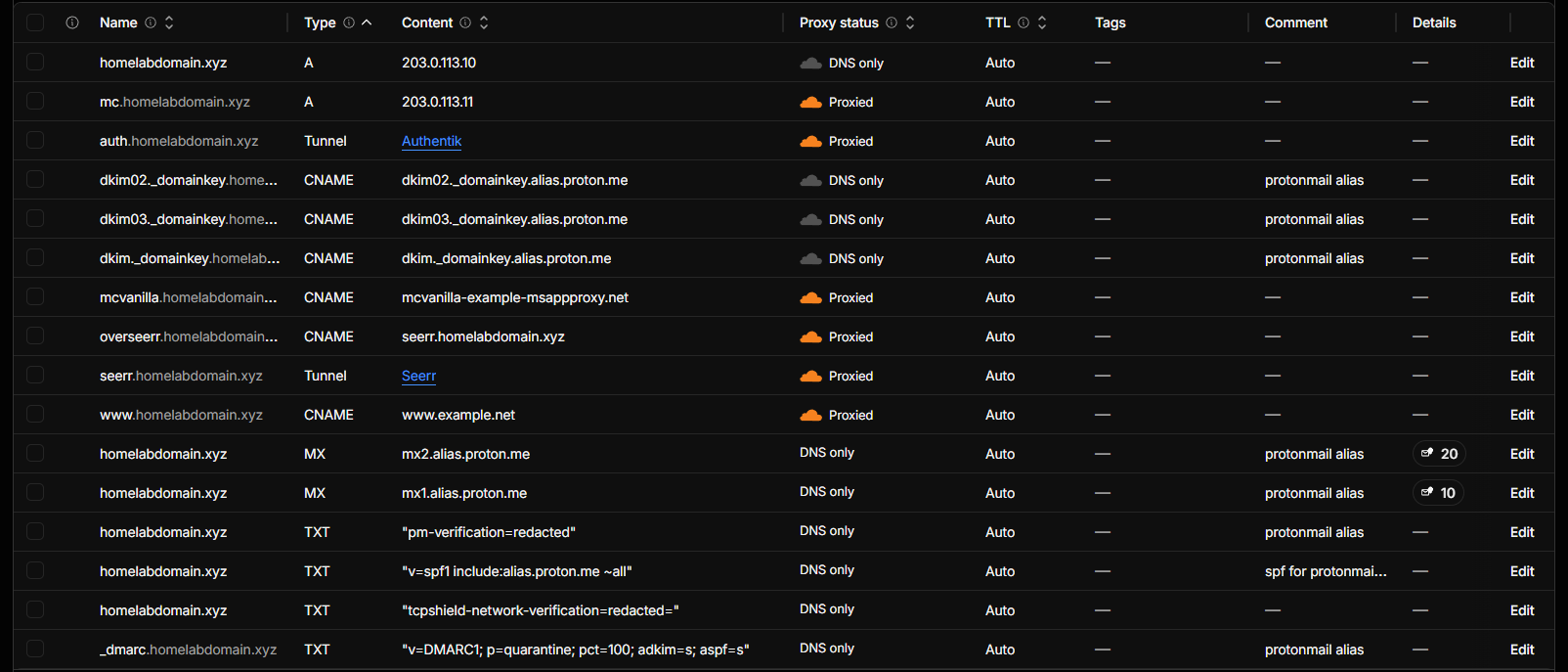
Six records in the public zone are proxied, the orange cloud in the Cloudflare dashboard. Copying those into IPA doesn’t work, and the reason is more interesting than a syntax problem.
The content Cloudflare shows you for a proxied record is the origin, and the world resolves something else. For auth, the name in front of authentik, the origin is a *.cfargotunnel.com CNAME. That name isn’t publicly resolvable by anything. It exists only inside Cloudflare’s edge as a tunnel identifier. Mirror it into IPA verbatim and the name stops working on the LAN entirely, while continuing to work fine from a phone on cellular, which is a fun morning.
Mirroring the resolved anycast addresses instead does work, right up until Cloudflare rotates them, at which point you are serving frozen values from a zone nobody thinks to check.
Delegation is the answer. Point each proxied name at the zone’s own Cloudflare nameservers, so IPA returns a referral and clients follow it to the live answer:
Verify that what comes back is fresh, with nothing cached from before the change: the response should carry no aa flag, and the TTL should count down between queries. An authoritative answer here means IPA answered it itself, and that’s the failure you are checking for.
There’s a feature that looks purpose-built for this and is not. ipa dnsforwardzone-add creates a zone whose queries get forwarded upstream, and that reads just like what a proxied name needs. When you’re already authoritative for the parent zone, the master zone answers first, returns NXDOMAIN with aa set, and the forward zone is never consulted. It fails closed, with no error anywhere, and the only symptom is a name that doesn’t resolve.
Mail records are a separate case and easier than they look. MX, SPF, DKIM and DMARC are queried by external senders and receivers, and those always reach Cloudflare. Nothing on the LAN ever asks IPA for them. I mirrored them for completeness, but they carry no traffic and drifting out of sync with Cloudflare costs nothing.
Cutting the resolver over
The cutover itself is one line, added to Pi-hole under misc.dnsmasq_lines:
| |
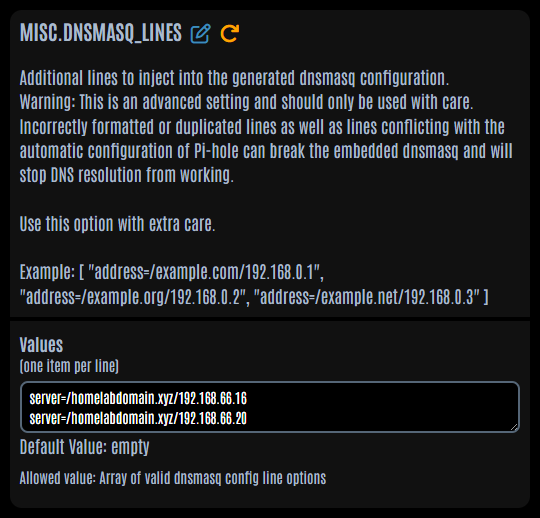
Before adding it, compare every name against the old resolver while both are still live. That comparison caught the split TXT records and the broken auth delegation, both of which would have been considerably more annoying to diagnose once the network depended on the new server:
Anything that prints is either a mistake or an intended difference, and you should be able to say which for every line before you touch Pi-hole. The proxied names show a difference here by design, since the delegated answer arrives with a different TTL, so check those by querying the new server and confirming the answer is a referral that resolves. Do the same sweep for TXT and MX at the apex, where dig +short TXT will show you the three-string problem immediately if it’s present.
Once the replica exists it goes in as a second forwarder:
Split horizon, found on five hosts
I found this on five machines, and it predates FreeIPA on every one of them. Split-horizon DNS promoted it from a harmless bit of belt-and-braces to the thing that takes the lab down.
The pattern is a public resolver configured as a secondary or fallback. 1.1.1.1 sitting in the DNS list behind the internal resolver, put there years ago as insurance. That configuration doesn’t fail over the way people expect, because a public resolver never fails. Ask it for nas.homelabdomain.xyz and it answers immediately and confidently: NXDOMAIN, because the name doesn’t exist in the public zone. The client caches a real negative answer and moves on.
Everything works until the primary resolver hiccups for a few seconds. Then internal names vanish while external names stay perfectly fine, which sends you looking at the wrong thing, and by the time you have logged in to look, the primary has recovered and nothing reproduces. A fallback resolver has to be another internal resolver that knows the zone, or nothing at all.
Fixing it is per host, and where the configuration lives varies:
| Host style | Where DNS is configured |
|---|---|
| netplan, no NetworkManager | the netplan YAML |
| NetworkManager | the NM connection profile, which may be generating the netplan file |
| OpenMediaVault | the OMV config database, via omv-confdbadm |
The NetworkManager case is where I lost time. Editing a netplan file that NetworkManager generated does nothing at all, because the profile is authoritative and regenerates it. And nmcli con mod updates the stored profile without touching the live link, so resolvectl status keeps showing the old servers and you conclude the edit failed. Apply it with:
| |
which pushes the change to the running connection without dropping it. A resolvectl dns <iface> <servers> override does work, and it’s transient: any reconfiguration wipes it. The same host went back to the old servers twice before I stopped reaching for that command.
OpenMediaVault regenerates /etc/netplan/* from its own database on every deploy, so file edits there survive until the next unrelated change in the web UI and then vanish. Use omv-confdbadm update conf.system.network.dns and let OMV write the file.
Where this leaves me
At this point there is a directory: a Kerberos realm, an LDAP tree, an internal CA, and DNS that answers for the whole domain internally while the public zone carries on unchanged. I had enrolled nothing in it yet, on purpose. FreeIPA ships an HBAC rule named allow_all that’s enabled on a fresh install and means what it says, so hardening the server has to happen before the first client joins, and several other things fall into the same category.
The next post covers that: replacing allow_all before enrollment, the anonymous LDAP bind that can read user entries by default, an sshd drop-in that Rocky’s own shipped config overrides, and then enrolling clients across Ubuntu, Debian and OpenMediaVault, each of which has its own way of being awkward. After that, the replica, which runs in a container and taught me more about 389-ds replication than I wanted to know.
Poking at it while nothing depends on it
Between a finished install and the first enrolled client there is a window where every read-only command is free, and no output you get back is complicated yet by anything you did later. I spent an evening in that window and would spend it again.
The CLI is regular enough to guess at. Most objects answer to -find, -show, -add, -mod and -del, so ipa user-find, ipa host-show, ipa dnszone-find all behave the way you would expect after seeing one of them. ipa help topics lists the families, and --all --raw on any -show strips the presentation layer and prints the underlying LDAP attributes.
| |
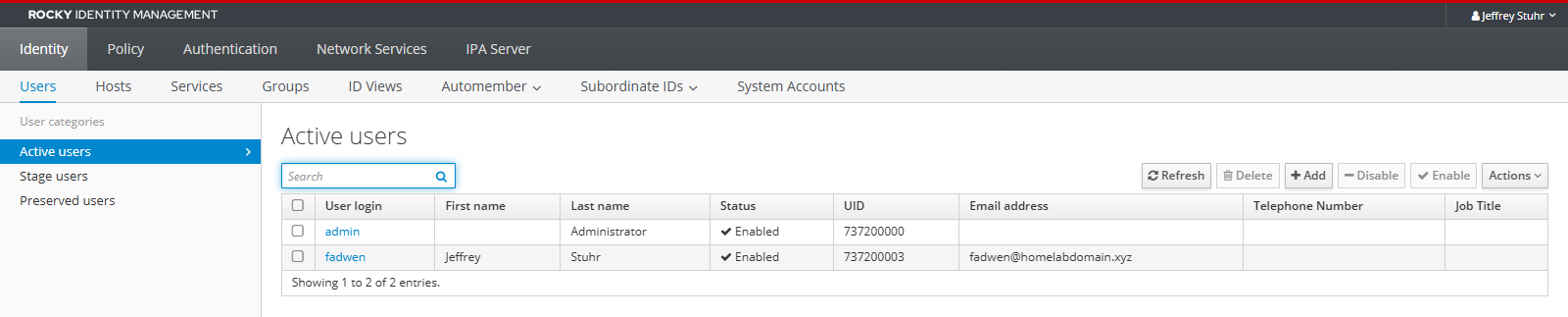
ipa idrange-find is where I would start. The installer picks a random 200,000-wide POSIX ID range for the realm, so directory users come out with uids in the 737,200,000 region, nowhere near 1000. Two realms built independently therefore don’t collide when you later join them by trust, and that enormous number turns up again in a later post, when an NFS server can’t resolve it and denies access to a credential that was perfectly valid.
The Kerberos side is more satisfying to prod at, because you can watch a ticket do work:
That ldapsearch runs with no password anywhere in the command, because the ticket authenticates the bind. Seeing GSSAPI work from a plain shell is the clearest demonstration I know of what a realm buys you, and it’s the same mechanism that makes ssh to an enrolled host stop asking for anything.
ipa-healthcheck ships separately (dnf install ipa-healthcheck) and is the closest thing to a built-in second opinion. On a fresh single server, ipa-healthcheck --failures-only returns an empty JSON array, and knowing what clean looks like before you change anything is more useful than running it for the first time during an outage.
The web UI lives at https://ipa.homelabdomain.xyz/ipa/ui, and your browser wants the realm CA from /ipa/config/ca.crt first unless you enjoy certificate warnings. 4.13 ships a beta rebuild of the interface with a link to it from the classic login page; both are live and both talk to the same API.
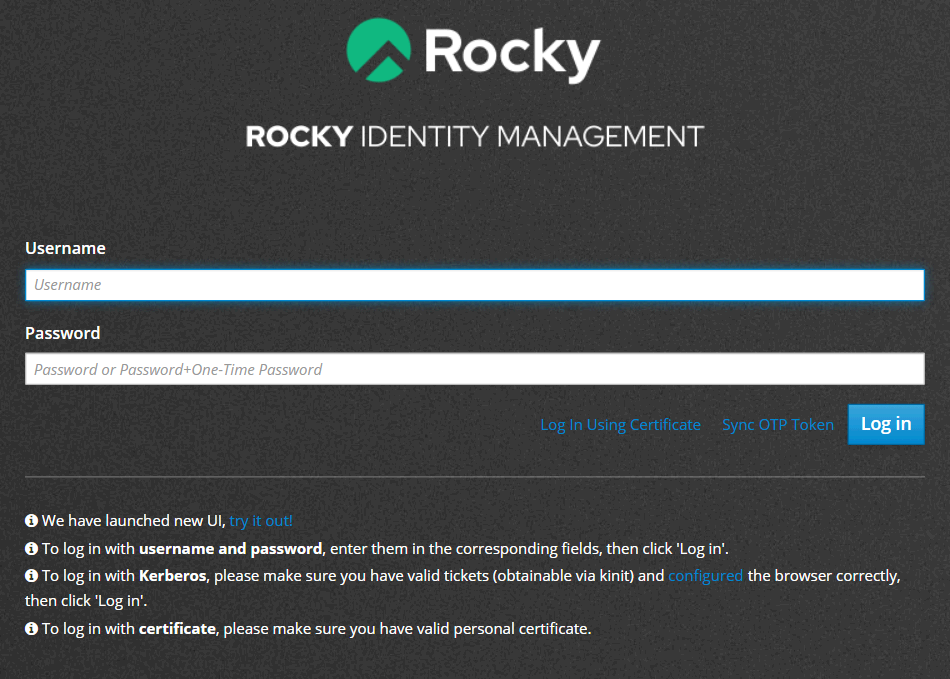
| Page | What it shows |
|---|---|
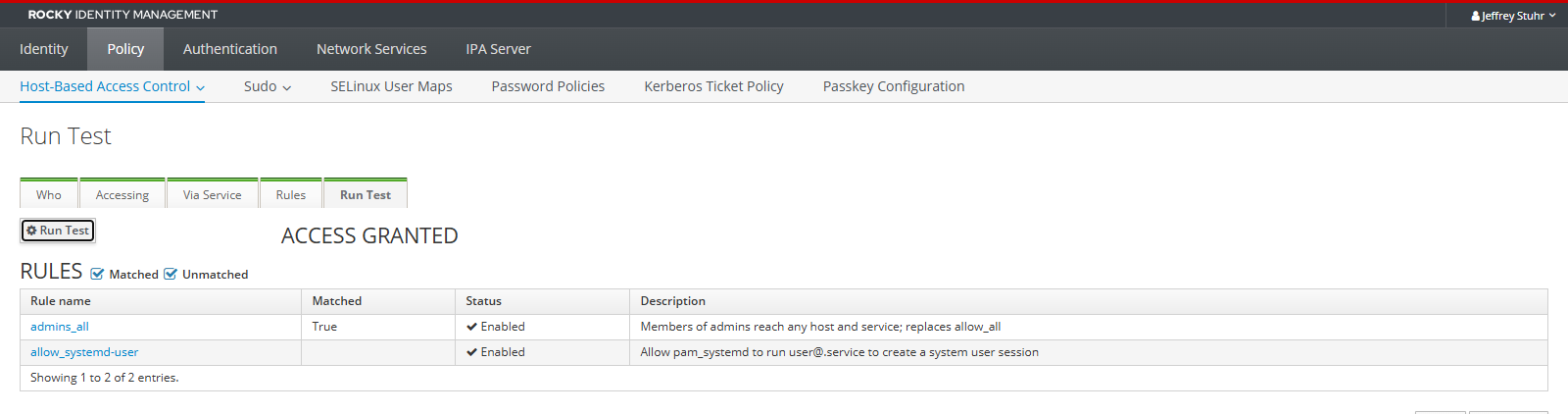
| Policy, Host-Based Access Control, HBAC Test | Predicts whether a user may reach a service on a host, before you rely on it |
| Policy, Password Policies | The default policy, and per-group policies layered over it |
| IPA Server, Role-Based Access Control | Roles, privileges and permissions, the delegation model most people never touch |
| IPA Server, ID Ranges | The same range idrange-find prints, with the SID mapping alongside |
| IPA Server, API Browser | Every command and parameter the CLI and UI both call |
| Authentication, Certificates | Everything Dogtag has issued, including the service certs from the install |
| Authentication, OTP Tokens | Where a TOTP token gets attached to an account |
| Network Services, DNS, DNS Zones | The zone from earlier in this post, records and all |
| IPA Server, Topology | A graph of replication agreements, which is a single dot until the replica exists |
HBAC Test is the page I keep going back to. It takes a user, a host and a service, evaluates the rules as the KDC would, and tells you which rule matched. ipa hbactest --user=admin --host=ipa.homelabdomain.xyz --service=sshd does the same from the CLI, and both answer a question that is otherwise only answerable by trying to log in and seeing what happens.
References
- FreeIPA 4.13.0 release notes
- Ubuntu 26.04 source package: freeipa, binary packages built
- Launchpad bug 1875114: freeipa-server package missing from Ubuntu
- RFC 7208 section 3.3, multiple strings in a single DNS record
- Samba wiki FAQ, SysVol replication and DFS-R
- Windows Server evaluation period extension, Microsoft Q&A