
Every application in this series so far has needed help. Tautulli couldn’t be told who you are, OpenMediaVault had no delegated authentication mode at all, and the answer in both cases was a reverse proxy asking the identity provider on their behalf.
Proxmox VE doesn’t need any of that. It speaks OpenID Connect itself, as a realm type, in the shipping product. The work is configuration on both sides and nothing in the middle.
I have done this before, pointing the same realm type at Entra ID back in 2024. Doing it again against a self-hosted identity provider changed some of the answers, and a section near the end covers where.
- Proxmox VE 9.0.3
- authentik 2026.8.0
- Realm type
openid - Components in the request path: none
Skipping the reverse proxy
Forward auth would have worked here. Putting Proxmox behind Caddy with the snippet from part three is two lines, and it would produce a login prompt from authentik in front of the Proxmox interface.
It would also be the wrong shape.
| Property | Forward auth | Native OIDC |
|---|---|---|
| Components in the path | proxy, outpost, identity provider | identity provider |
| Identity granularity | authenticated, or not | users, groups, roles |
| If the identity provider is down | locked out | pick a local realm |
The first row is the argument against complexity. Forward auth exists to give an identity to software that can’t obtain one itself, and paying its cost for software that can is buying a translation you don’t need.
The second row is the argument for capability. A proxy tells the application that somebody authenticated, and authentik’s headers can carry a username and a group list, but the application has to know what to do with them. Native OIDC hands Proxmox a real identity, and Proxmox’s own permission system takes it from there: users, roles, an access control list.
The third row is the argument that decides it. Proxmox is a hypervisor, and putting a hypervisor’s management interface behind a proxy that runs on a virtual machine is a loop: the interface you would use to fix a cluster problem is hosted by the cluster having the problem. My proxy happens to run on separate hardware, for reasons from the first post, so that particular loop is already broken here. The dependency remains either way.
Native OIDC has no such path. The login page keeps its realm dropdown, PAM stays configured, and an authentik outage costs single sign-on instead of access. That property is why this arrangement suits a hypervisor, and it outweighs every convenience argument above it.
The handshake
Proxmox never proxies anything to authentik. The browser talks to both, in turn, and the two servers exchange one code out of band. Keep that in mind for the failures below, because each one lives at a boundary where the two systems held different values for the same thing.
Configuring authentik
Create an OAuth2 and OpenID Connect provider with an application in front of it, from Applications, then Create with Provider.
The application slug determines the issuer URL, so choose it with care. A slug of proxmox produces:
| |
The provider fields, as mine are configured:
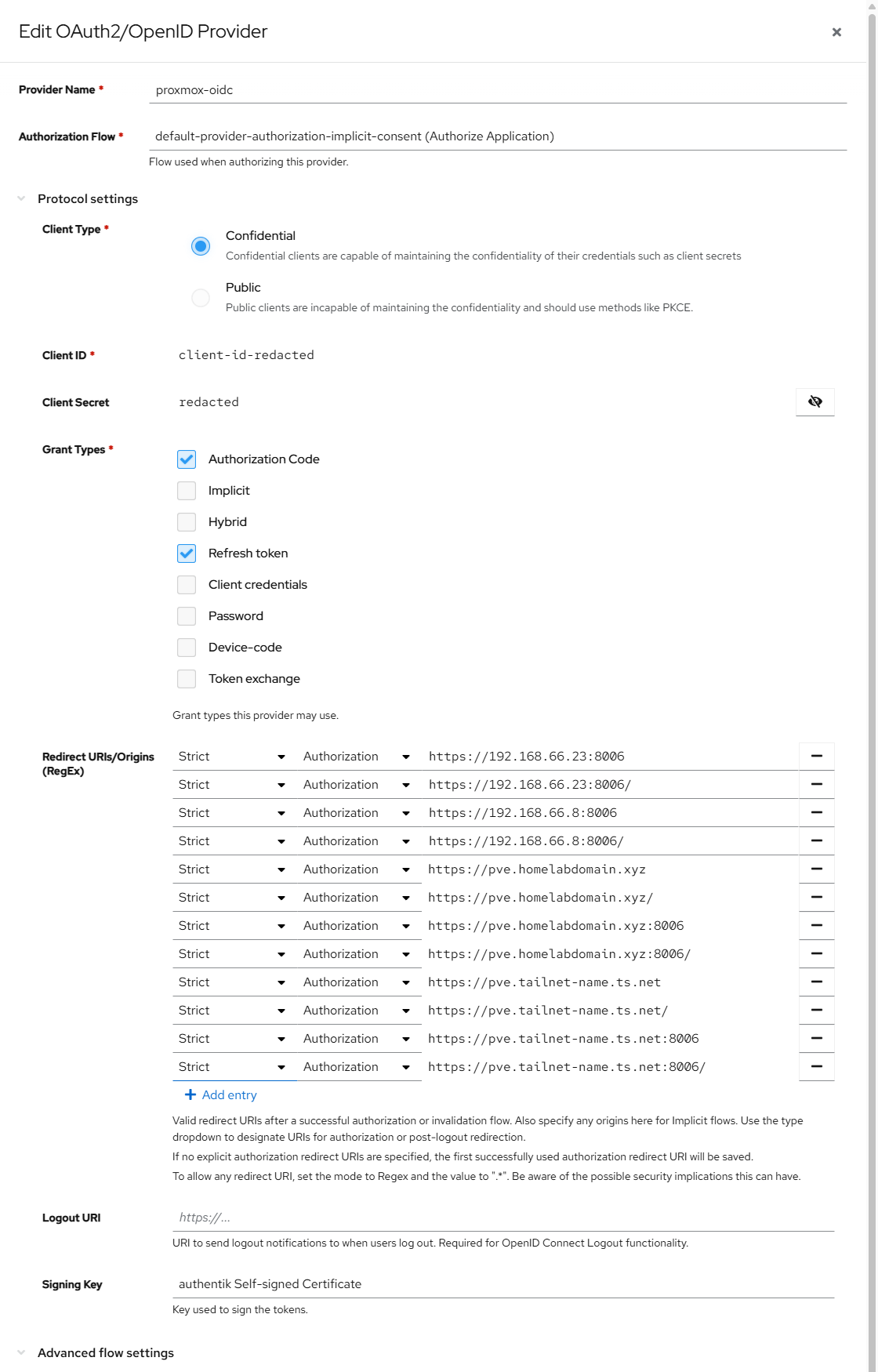
The signing key deserves a note, because it’s a callback to part two. That entry is the self-signed certificate authentik generates on first start, barred from serving your browser because nothing trusts it. In this provider it does real work. It signs the ID token, and with a key set the discovery document advertises a single algorithm:
| |
A certificate nothing trusts for TLS is still a perfectly good asymmetric keypair. It signs a token that only authentik issues and only Proxmox verifies, against a public key fetched from the discovery document. Different job, same file.
Copy the client ID and the secret, then confirm the discovery document answers before going further. A 404 means the slug is wrong and nothing downstream will work:
| |
Configuring the node
Two commands, with a login between them.
--default 0 is the flag to notice. It keeps PAM as the login page default, so a local account stays one dropdown away. That’s the third row of the table above, turned into a flag.
The same realm is visible under Datacenter, Permissions, Realms, which is where to confirm it landed with the settings you meant:
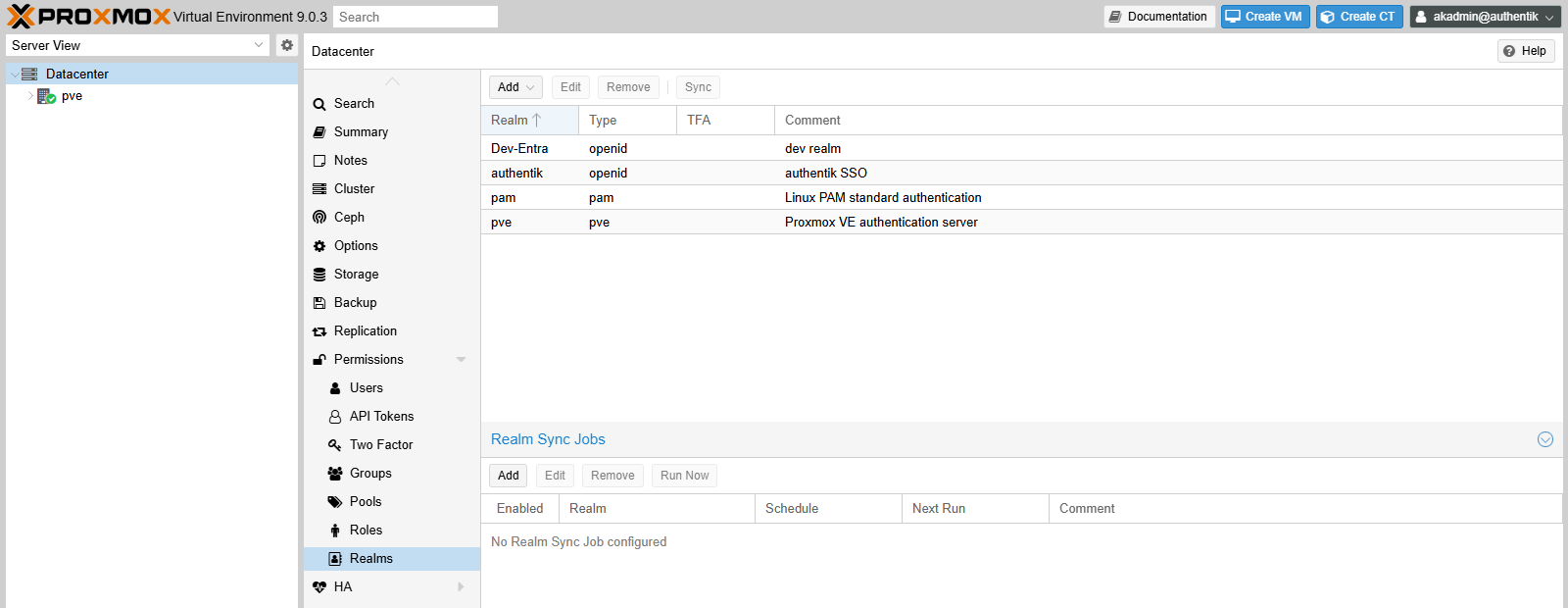
Then sign in once, selecting the authentik realm at the login screen. With --autocreate 1 that first successful sign-in creates the Proxmox user, holding no permissions at all. An empty interface at this point is the system working. The user has to exist before it can be granted anything, so the role comes last:
| |
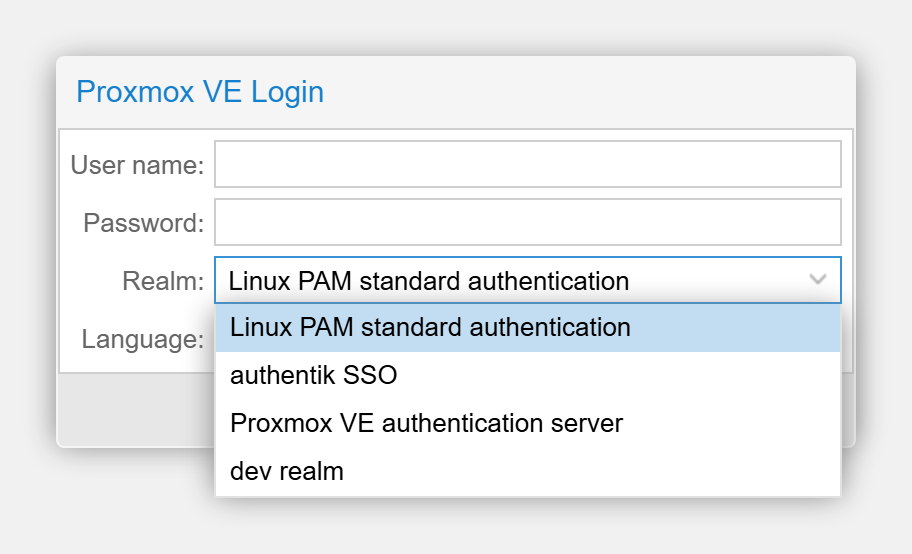
The login page is where the third row of that first table stops being an argument and becomes something you can see. Both realms are in the dropdown, PAM is the one selected, and an authentik outage changes which entry you pick, never whether you get in:
Where the two systems disagreed
Each failure below produced an error pointing somewhere other than the cause.
A redirect URI is whatever the browser typed
Proxmox builds redirect_uri from the exact URL in the address bar, and authentik matches it strictly. Reaching the interface through a Tailscale serve listener on 443 makes that https://pve.tailnet-name.ts.net, with no port and no trailing slash. Registering the obvious https://host:8006/ matches none of it, and the error is a flat Redirect URI Error that names nothing.
Register every form you might use. Mine currently holds twelve entries: two IP addresses with the port, and two hostnames in four shapes each, bare and with a trailing slash, with and without :8006.
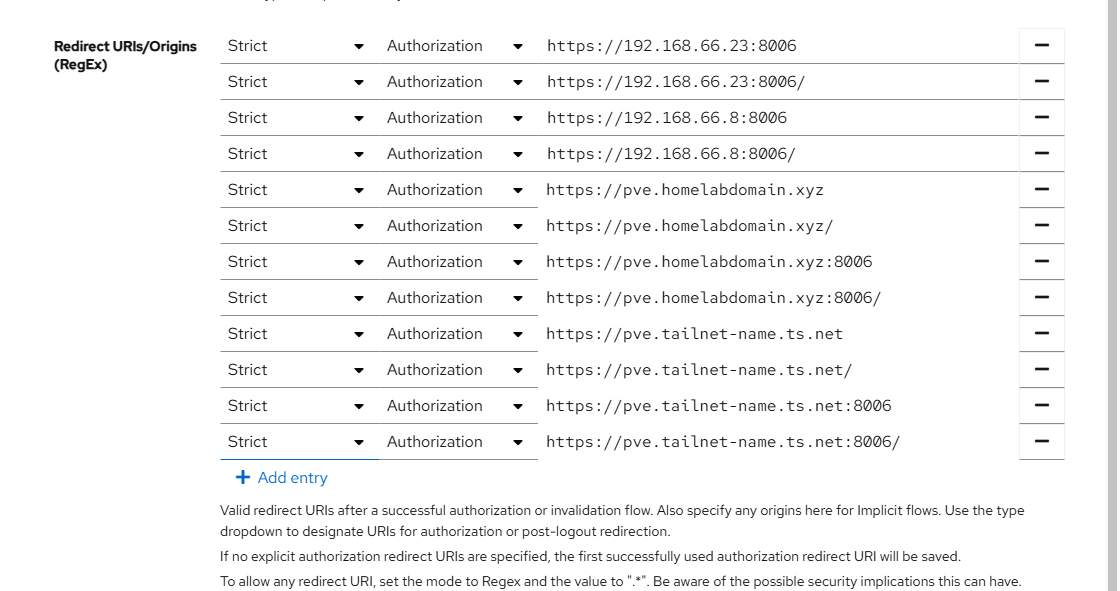
Adding a hostname later breaks the login again until its URI is registered too, which happens the moment you put a real certificate on the node and start reaching it by name.
An empty grant type list permits nothing
Creating a provider programmatically can leave grant_types empty. An empty list allows no grant at all and defaults to nothing. What the browser shows is a generic invalid_request with the text The request is otherwise malformed, which is identical to a dozen unrelated causes.
The real reason appears only in the server log:
The general form of this is more useful than the specific fix. Creating authentik objects through its Django ORM skips the setup logic that its API and its interface apply, so you get a provider that looks complete in the database and rejects every request. Use the API, or set every default explicitly and expect none of them to be filled in for you.
The username claim is set once
Proxmox resolves an incoming identity to a username through one claim, and the code doing it explains more than the documentation does. From PVE/API2/OpenId.pm on 9.0.3:
| |
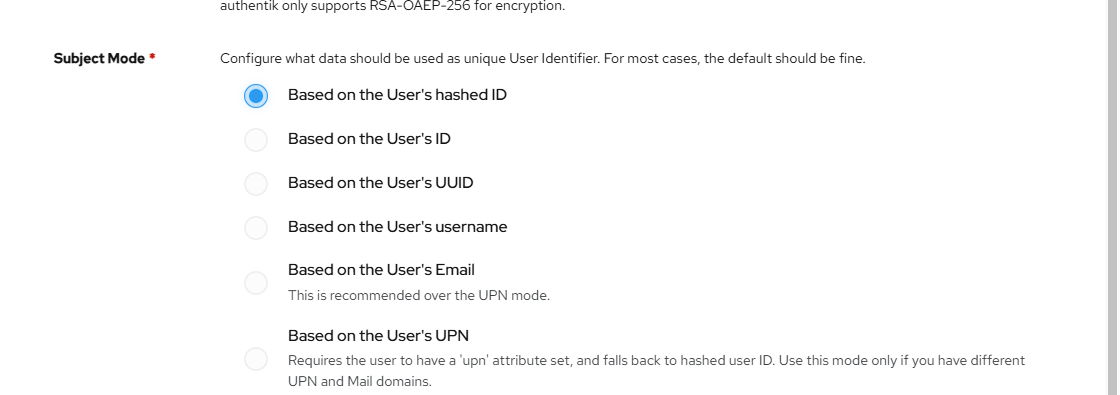
Leave the flag off and the default is sub. authentik’s sub mode ships as a hashed user ID, so Proxmox names the account after a hex string. The login succeeds, the user is real, and every permission you grant afterwards hangs off something unreadable.
username and subject are legacy aliases caught by those compat branches, so the guides recommending --username-claim username do still work. authentik emits no claim by that name, the first test misses, and the third branch substitutes preferred_username on your behalf. Anything else authentik doesn’t emit reaches the final die and the login fails outright.
Then the line that changes the stakes. From PVE/Auth/OpenId.pm:
fixed => 1 means set once at creation. The option is absent from the modify schema, so no pveum realm modify will change it. Getting it wrong commits you to deleting the realm and building it again, along with every user autocreated under it. groups-claim, two lines below, carries no such restriction, so a pair of settings that look alike in the documentation behave nothing alike in practice.
There’s an escape hatch if you inherit a realm with the claim unset and would rather not rebuild it. The other side of this integration is adjustable: authentik’s sub mode decides what goes into sub, and pointing it at the username converts those hex-string accounts into readable ones without touching Proxmox at all.
That pairing is the part to carry away. One side of this integration is set-once and the other can change its mind, and working out which is which before you commit is the difference between a typo and a rebuild.
ACME registration wants an answer
Proxmox ships a self-signed cluster certificate, so a browser warns on every direct visit. Fixing that is optional and sits next to this work. The ACME contact is a plain email address and a mailto: is rejected, and account registration prompts for terms agreement, so a scripted run needs an answer piped into it.
No public certificate authority will issue for a private IP address, so an IP-based URL warns forever regardless. A hostname is required, which means the redirect URI list from the first trap changes again.
A certificate the node renews itself
Proxmox has native ACME with DNS-01 plugins, which is the same challenge type as part two arriving in a different product.
| |
Renewal runs from pve-daily-update.timer inside thirty days of expiry. No cron entry, no deploy hook, no separate alerting channel to tell you when the other two stopped working. That’s the same argument that moved my reverse proxy to Caddy, arriving in a different product. That self-renewal is why this beats copying a wildcard certificate from somewhere else.
What I set without knowing why
My notes carried a short list of settings that were working without my knowing whether they were necessary. Both entries now have answers.
The signing key. With one configured, the discovery document advertises RS256 and nothing else. Without one, authentik falls back to a symmetric algorithm keyed on the client secret, and whether Proxmox accepts that is a question I haven’t tested. What I can say precisely is narrower than “a signing key is required”: setting one is what makes RS256 available, and RS256 is what my working configuration uses.
The refresh token grant. This one is settled. The provider has refresh_token in its grant types, and authentik’s refresh token table holds zero rows for it:
Every sign-in since this was built has used authorization_code and nothing else. Proxmox exchanges the code, reads the ID token, creates its own session ticket, and never comes back for a refresh. The grant is harmless and unused, so authorization_code alone describes what happens.
Both of those were in my notes as things I had set without knowing why. Writing them down is what turned them into questions, and the second one had an answer sitting in a database table the whole time.
The same realm, a different provider
Two years ago I wired this same realm type to Entra ID through the Proxmox interface. Reading that post next to this one, the settings that came out differently have nothing to do with Proxmox.
The default realm went the other way. That post ticks the Default box, so Entra becomes the realm the login page selects. This one passes --default 0 and leaves PAM there. The reasoning changed when the identity provider moved into my house. Entra is run by Microsoft across more datacentres than I can name, and defaulting to it is a reasonable bet. My authentik is a container on a second-hand thin client fifteen feet from the hypervisor it authenticates. Making that the default login path for the machine I would use to fix it is a bet with worse odds, so the dropdown stays on the local realm and single sign-on is something I pick each time.
The username claim is the second. That post never touches the field, because the default worked. Against authentik it had to be set explicitly, since the claim the guides name doesn’t exist there. Same category of problem as the redirect URI: two systems, one value, no agreement, and an error message that discusses neither.
The rest reads almost identically, and that’s the point of a standard. The issuer URL comes from a discovery document, the client ID and secret get pasted across, the first login creates a user with no rights, and a permission grant follows. Change the provider and most of the procedure survives. None of the six applications before this one would let me say that.
Final state
| Setting | Value |
|---|---|
| Issuer URL | https://auth.homelabdomain.xyz/application/o/proxmox/ |
| Client type | confidential |
| Grant types | authorization_code, with refresh_token set and unused |
| Scopes | openid, email, profile |
| ID token signing | RS256, using authentik’s self-signed keypair |
| Username claim | preferred_username |
| Realm default | 0, so PAM stays the login default |
| Autocreate | 1, with no permissions until a role is granted |
| Redirect URIs | every hostname, port and trailing slash combination |
| Certificate | Let’s Encrypt through Proxmox’s own ACME, self-renewing |
Seven posts in, this is the first application that met the identity provider halfway, and the difference in what the work buys isn’t subtle. Forward auth buys a yes or no at the door. OIDC buys a user that the application already knows how to reason about, in a permission system that was there before I arrived.
Get it
There’s nothing to publish for this one. Both halves are configuration: an application and provider in authentik’s interface, and two pveum commands on the node. The realm definition lives in /etc/pve/domains.cfg on the Proxmox side, and the client secret lives with it, so that file isn’t a candidate for a repository either.
Sources
- Proxmox VE: user management and realms
- Proxmox VE: certificate management and ACME
- authentik: OAuth2 and OpenID Connect provider
- OpenID Connect Core: authorization code flow
A follow-on to the six-part identity stack series: authentik, certificates, forward auth, Cloudflare, Tautulli, OpenMediaVault.