
The first post in this series left a working directory with nothing in it: a Kerberos realm, an LDAP tree, an internal CA, and DNS answering for the whole domain internally. The reason I stopped short of enrollment is a rule named allow_all.
FreeIPA ships it, it’s enabled on a fresh install, and it means what the name says. Any user, any host, any service. The first machine you enroll into a default install is therefore a machine where every account in the directory can reach every service, and you have to notice that yourself, because nothing about the enrollment tells you.
That decided the order. Every change below happened before the first client joined, and a few of them are considerably harder once hosts depend on the server.
What happens when somebody logs in
Before the commands below mean much, it helps to have the shape of what enrollment builds. None of this is specific to my lab.
Somebody types ssh nas.homelabdomain.xyz. On an unenrolled machine, sshd looks the account up in /etc/passwd, checks a key against ~/.ssh/authorized_keys or a password against /etc/shadow, and that’s the whole story. On an enrolled machine a longer chain runs, and every trap in this post is a break somewhere along it.
SSSD is the client-side daemon doing that work. It sits between the operating system’s ordinary lookups and the directory, and it’s organized into providers, where a provider is the backend SSSD consults for one class of question. Identity, meaning who this user is and what groups they hold. Authentication, meaning whether this credential is good. Access, meaning whether this user may reach this service on this host. Sudo, meaning what they may run once they’re in. Enrollment points most of those at IPA, and the one it leaves unset on Ubuntu is the first trap below.
The chain runs roughly in that order. Identity comes first, with nsswitch.conf sending the lookup to SSSD, which asks the directory and gets back a uid, a primary group and the full group list. Authentication follows, either a Kerberos ticket the user already holds or a password SSSD checks against the KDC. An ssh key sidesteps that step, because sshd calls sss_ssh_authorizedkeys and the key comes off the user’s directory entry. Access comes next: SSSD asks the IPA server whether this user may reach this service on this host, and that decision is HBAC, host-based access control, a rule naming some users, some hosts and some services. Then the session starts, and the home directory gets created only if something on the host is configured to create it. Sudo happens later and separately, when the user runs a command and the sudo binary asks SSSD what rules apply.
Kerberos is doing real work at the authentication step and is absent from the access step. Reading HBAC as “Kerberos permissions” sends you into the wrong logs, and it explains how klist can show a perfectly good ticket on a host that won’t let you log in.
Deny by default, before anything joins
Replacing allow_all takes a short sequence, and the last line is the one I wouldn’t skip:
I made admins_all as broad as allow_all on the host and service axes and narrow on the one that counts. Category all for hosts and services, membership restricted to the admins group. The realm still works for me and stops working for everyone else. That’s the state a new directory should start in.
ipa hbactest runs the same evaluation the server performs when a client asks, and names the rule that matched. Run it before you disable allow_all and again after, because the failure mode here locks you out of the machine you are administering, and finding that out through ssh is slower than finding it out through a command that prints Access granted: True.
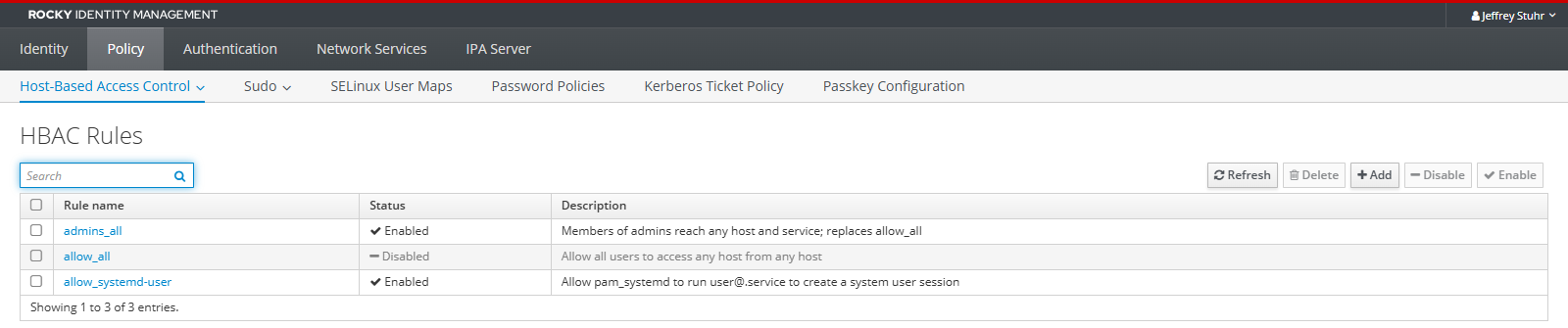
A rule is scoped on three axes, and each accepts either explicit members or the category all: which users or groups it covers, which hosts or host groups it applies to, and which services. Services are directory objects too, so sshd, sudo, login and cockpit are named things you attach to a rule, and ipa hbacsvc-find lists what your realm already knows about. Grouping is where this becomes manageable at scale, since a rule attached to a host group covers every machine added to that group afterwards, with no rule edit.
The thing HBAC doesn’t do is authorization in the broader sense. A rule decides whether a user may reach a service on a host at all. What they can then do once they’re in is sudo rules, group membership and file permissions, which are separate objects with separate evaluation. Reading HBAC as “permissions” leads you to look for the wrong thing when a user gets in and can’t do their job.
HBAC only governs what an enrolled host asks about. Nothing here restricts what an unenrolled machine can read out of the directory. That default is separate, and worse.
Trimming the server itself
The fresh install left a handful of things open in ways I didn’t want on a host that holds every credential in the lab.
ssh, keys only
Unremarkable, except for where the file goes:
Note the 01- prefix. sshd_config is first-match-wins, so the earliest value obtained for a keyword is the one that applies. Rocky ships /etc/ssh/sshd_config.d/50-redhat.conf, and the drop-in directory is read in lexical order. A file named 99-hardening.conf therefore loses every keyword that 50-redhat.conf already set, while sshd -t reports the configuration as valid and systemctl reload succeeds. Numbering your own overrides high is right for systemd units and for udev. Here it is backwards.
Leave GSSAPIAuthentication yes alone while you’re in there. Kerberized ssh depends on it, and turning it off makes the whole point of the directory stop working on the one host that has to keep working.
Cockpit was listening
Enabled, running and open in the firewall, because that’s how Rocky ships. I turned it off here, and I want to be clear that this is a decision about one host and says nothing about Cockpit.
Cockpit is good software and it runs on most of my other machines. It hands a headless box a web console covering the journal, storage, network configuration, package updates, containers and virtual machines, plus a real terminal, all authenticated through the system’s own PAM stack with no separate account database to maintain. Opening a browser at a machine you haven’t touched in eight months beats reconstructing how you used to reach it.
It pairs unusually well with FreeIPA, too. Join a host that already has Cockpit installed and the enrollment creates the HTTP/ service principal and writes /etc/cockpit/krb5.keytab on its own, so Kerberos single sign-on into the console works with no further setup: a user holding a valid ticket opens the URL and is already logged in, with directory accounts and directory sudo rules behind it.
The identity server is the exception. This machine is the KDC, the CA and the directory at once, and root on it binds as Directory Manager with no password, so a web console here is a browser-reachable path to the account that owns every credential in the realm. A Cockpit vulnerability on an ordinary host costs you that host. On this one it costs the realm, and I would be relying on session handling in a browser to keep that from happening.
The trade I took is that this box gets administered over ssh with a key and none of the graphical conveniences. The server is one machine and I touch it rarely. If you want the console on your directory server anyway, the middle path is leaving it running with the firewall source restricted to a management network.
Anonymous LDAP could read user entries
A 389-ds default that predates anybody’s threat model. Any host on the network, enrolled or not, could bind with no credentials and enumerate the directory. Restrict it to the root DSE, the small unauthenticated record at the top of an LDAP tree that advertises what the server is and which naming contexts it holds. The server stays discoverable without being readable:
That command changes how you think about the whole host. It talks to ldapi, a Unix domain socket on the filesystem with no network port behind it, and -Y EXTERNAL means the bind is authenticated by the OS uid at the other end of that socket, with no password involved. Because nsslapd-ldapimaprootdn maps local root to Directory Manager, 389-ds’s superuser account that sits outside the directory tree and bypasses access control entirely, it runs with total authority and no credential anywhere in it.
Anyone who can become root on the IPA server therefore owns the directory outright, with nothing to steal and no password to rotate. Sudo on that one host is the security boundary for the entire realm, which is the argument for doing the ssh hardening above before anything else on this list.
Password policy: eight characters, no history
The global policy on a new realm is weaker than most people assume, and per-group policies layer over it later:
Unattended updates
dnf-automatic handles patching, restricted to security errata, configured in /etc/dnf/automatic.conf:
| |
The package ships four timer units and they don’t all read that file the same way. dnf-automatic-download.timer, dnf-automatic-install.timer and dnf-automatic-notifyonly.timer each override apply_updates and download_updates with their own behavior, so a machine running the notify-only timer with apply_updates = yes in the config installs nothing at all and tells you it is configured to install. Only plain dnf-automatic.timer does what the file says. upgrade_type is read from the config in every case, so the security-only restriction survives whichever timer you pick.
There’s an IPA-shaped reason to keep this narrow. When the ipa-server packages themselves get updated, ipa-server-upgrade runs automatically as part of the package transaction. It stops IPA services, updates the LDAP schema, processes every .update file under /usr/share/ipa/updates, and rewrites the service configurations. When it fails partway, ipactl then refuses to start the server, because the code version and the configuration version no longer agree, and the fix is reading /var/log/ipaupgrade.log and re-running the upgrade by hand. Unattended at four in the morning, on the one host everything else authenticates against, is a poor setting for that to happen in.
Security-only reduces how often the question comes up without eliminating it, so I read the emitted output. Kernel and glibc updates also need a reboot before they take effect, and the timer won’t reboot the machine for you unless you configure it to.
What a backup can restore
ipa-backup writes to a timestamped directory under /var/lib/ipa/backup/, named ipa-full-YEAR-MM-DD-HH-MM-SS in GMT, alongside a header file recording the type, the host and the IPA version.
Run it once by hand before trusting a timer, because the default behavior surprises people:
A full backup is offline. It stops every IPA service, takes the backup, and starts them again, so a weekly full backup is a scheduled outage of the realm for as long as it takes. Pick the hour with that in mind. A data-only backup can run with the services up, using --data --online, and --gpg encrypts whichever kind you take. If the run dies on space, the temporary files are the cause and TMPDIR=/var/tmp ipa-backup moves them.
The constraints on the other end are the part to understand before you rely on any of this. A backup can’t be restored onto a different host, and it can’t be restored into a different version of IPA, so an upgrade invalidates every backup you took before it for the purpose of restoring onto a rebuilt machine, with nothing anywhere recording that it did. A full restore also puts back files like /etc/passwd, /etc/group and /etc/resolv.conf, because anything IPA touched is in there. Restoring one server in a topology makes it the sole source of truth, and every other server has to be re-initialized from it afterwards.
Read together, ipa-backup covers “I have broken the directory” well and covers “the machine is gone” only if you can rebuild a host with the same FQDN, the same address and the same IPA version first. The replica in the next post exists partly for that reason.
One last thing about the timer. The backup lands on the local filesystem of the machine being backed up, so the job has to copy it somewhere else afterwards to be a backup at all. Mine writes to /var/lib/ipa/backup and then pushes the new directory to the NAS.
Enrolling a client, in order
Everything so far has happened on one machine. The directory denies by default, ssh takes keys only, the web console is gone, anonymous binds see nothing past the root DSE, passwords have a policy behind them, and a backup has run once while I watched it. Not one other host in the lab knows the realm exists.
Enrolling a client is the first work that happens somewhere else. The machine gets a host principal and a keytab of its own, an SSSD pointed at IPA, and an authentication stack rewired to consult the directory before it consults the local files, so the login chain from earlier in this post starts running on a box I am not sitting in front of.
The sequence is fixed, and skipping a step produces an error that points at the wrong thing.
DNS first, forward and reverse together:
| |
Then the client’s own idea of its name, before anything else runs. IPA keys the host principal off hostname -f, so a client that thinks it is called nas and not nas.homelabdomain.xyz enrolls with a principal that doesn’t match anything:
Then an admin creates the host entry with a one-time password, and only the OTP travels:
| |
The OTP pattern is the part I would keep in any environment. Admin credentials stay with the person who has them, the operator doing the enrollment gets a string that works once, and nothing about the process requires handing a directory password to a machine or to somebody else’s shell history.
One thing you can’t do, which I tried because it seemed tidier: build the host entry by hand over LDAP. DNS records, groups and sudo rules can all be created directly as Directory Manager, and host entries look like they should follow the same pattern. Setting userPassword on a host entry makes the KDC generate a Kerberos key for the principal, at which point ipa-client-install reports “Host already enrolled” and refuses, and --force-join can’t get past it while holding only an OTP. Use ipa host-add --random and let IPA build the entry.
What enrollment changes on the client
ipa-client-install isn’t subtle, and knowing what it touched makes later failures legible. It writes /etc/krb5.conf pointing at the realm, generates /etc/sssd/sssd.conf with the IPA providers, retrieves /etc/krb5.keytab holding the host principal, and switches the authentication stack over: through authselect, the RHEL tool that swaps whole PAM and nsswitch.conf profiles in and out as a unit, or by editing those files directly on Debian derivatives. It adds an AuthorizedKeysCommand pointing at sss_ssh_authorizedkeys to the sshd configuration, turns on GSSAPI authentication, and registers the host certificate with certmonger, a daemon whose whole job is watching certificates and renewing them before they expire.
The keytab is what gives the host an identity of its own:
| |
Principals for host/, plus any service you add to the machine later. A host that can present that keytab is trusted by the KDC to ask questions about users, and that trust is what makes id, sudo -l and sss_ssh_authorizedkeys work on a machine nobody has logged into.
ipa-client-install --uninstall reverses the whole thing and is the supported way to back out. Removing the packages by hand leaves the PAM stack pointing at an SSSD that is no longer installed, which is a memorable way to lock yourself out of a box you were only tidying up.
Where each distro gets awkward
Everything above is the same everywhere. Everything below is the tax for having a fleet that doesn’t agree with itself.
Ubuntu, every version: sudo_provider goes missing
ipa-client-install writes id_provider, auth_provider, chpass_provider and access_provider into /etc/sssd/sssd.conf, and doesn’t write sudo_provider. Four of the five providers from the chain above are pointed at IPA and the fifth is left blank. Meanwhile nsswitch.conf already reads sudoers: files sss and the SSSD sudo responder is running. Every component reports itself configured, sss_cache shows a healthy cache, and SSSD fetches zero sudo rules from the directory, so a user with a perfectly good rule attached to them is told they may not run sudo on that host. Nothing logs an error, because from SSSD’s point of view no sudo provider was requested.
I lost an hour to this on the first Ubuntu box and about ninety seconds on every one after.
Ubuntu 25.10 and later: sudo became sudo-rs
Canonical made sudo-rs, the Rust reimplementation, the default sudo in 25.10, with the stated plan of carrying it into 26.04 LTS and making it the only provider in the archive by 26.10. It’s a close drop-in for interactive use. It doesn’t implement the SSSD sudoers plugin, and distributing sudoers over LDAP is on its published list of things it leaves out.
The result is a host where SSSD caches the directory rule correctly, sss_cache and the SSSD logs both look right, and the binary that reads the rule never asks SSSD anything. Confirm the classic binary sees what you expect before switching to it:
I chose to diverge from the distro default here, and I want to be clear about the shape of the trade. Memory-safe sudo and directory-managed sudo are mutually exclusive on Ubuntu today. You pick one. In a lab where sudo rules live in the directory precisely so I can change them in one place, the classic binary wins, and I will revisit it if sudo-rs grows the plugin.
Ubuntu 26.04: a missing Python dependency
freeipa-client on 26.04 doesn’t depend on python3-packaging, and ipa-client-install dies at import before it does anything. Install it first and the enrollment proceeds normally.
The specific package changes, but the class of problem does not. Debian shipped freeipa-client without python-pyasn1 in 2014, and upstream shipped it without python3-augeas in 2018, both producing the same import traceback on first run. When ipa-client-install fails with a Python module error rather than a Kerberos or DNS error, install the module and try again before concluding the enrollment itself is broken.
OpenMediaVault: change config through OMV or not at all
OMV regenerates /etc/netplan/* and /etc/exports from its own configuration database on every deploy, so edits to those files last until the next unrelated change in the web UI. Use the database:
nsswitch.conf and PAM aren’t OMV-managed, so the enrollment itself survives deploys untouched. The boundary runs per file, so the useful question on an OMV box is which files OMV believes it owns.
Home directories exist nowhere by default
Enrollment gives a user an identity, not a place to land. On the RHEL family:
The --mkhomedir flag in the enrollment command above covers Debian and Ubuntu clients.
A local user at uid 1000 shadowed my directory account
I created my own account in the directory with the same name as the local account that already existed on every host, because keeping the name consistent seemed obviously correct.
Every machine in the lab had a local homelab at uid 1000 from its original build. nsswitch.conf lists files before sss, so on every one of those hosts the local account wins name resolution, and the identically named directory user is unreachable for login while still owning a completely different uid for anything Kerberos mediates. The account works and doesn’t work at the same time, depending on which subsystem is asking.
The fix was a rename, to a name no host had locally:
The rename leaves something behind. IPA keeps the old name as a Kerberos alias on the principal, so homelab@HOMELABDOMAIN.XYZ continues to authenticate against the renamed account and the collision you just fixed is still live. Clear it explicitly and then prove it:
Passwords set by an admin are expired on arrival by design, so the first kinit for a new account forces a change. The behavior is correct, and it looks like a broken account for about ten seconds.
Sudo rights and ssh keys, from one place
With an account that resolves, the two things I want it to carry to every host are sudo rights and an ssh key.
Sudo rules are directory objects like everything else. A rule granting the admins group full sudo everywhere:
Narrower rules replace the category flags with explicit members: ipa sudorule-add-host for specific hosts or host groups, and ipa sudorule-add-allow-command with --sudocmds for a command list. Building the broad rule first and tightening it afterwards is easier than the reverse, because a rule that grants nothing is indistinguishable from a rule SSSD never fetched, and you will spend the debugging time on the wrong layer.
Rules don’t arrive instantly. SSSD caches them, so a new rule reaches a client when the cache expires or when you expire it by hand with sss_cache -E:
| |
Running sudo -l -U <user> as root is the useful form. It reports what the directory offers that user on this host without needing their password or their session.
The ssh key is a single attribute on the user:
| |
sss_ssh_authorizedkeys serves it to sshd through the AuthorizedKeysCommand that enrollment configured, so the key appears on every enrolled host and, more to the point, disappears from every enrolled host when it’s removed here. Rotating a key stops being a loop over authorized_keys files that you will get 90 percent of. One caveat: --sshpubkey replaces the whole set, so a second key means passing both in one command.
Share access without touching file ownership
The NAS exports a media share whose files are owned by the service accounts that write them. I wanted my directory account to read and write that share without changing a single file’s ownership, which group membership does cleanly, because every directory on the share carries the setgid bit, so a new file inherits the directory’s group whatever the creating user’s primary group happens to be:
Matching the existing local gid is what makes this work without touching files. The directory group and the local group are the same number, so the permission bits already on disk are already correct.
Then it didn’t work, and the reason took a while to find, because the client was doing everything right.
rpc.mountd runs with --manage-gids, which is the default on Debian-derived NFS servers. That flag exists because the AUTH_SYS RPC credential structure carries at most sixteen group ids, so the server discards the group list the client sent and recomputes membership itself using getgrouplist() against its own passwd and group databases. Being over the sixteen-group limit is the usual reason to enable it and has nothing to do with what happened here.
The NAS wasn’t enrolled yet. Asked to resolve uid 737200003, it found nothing, computed an empty group list, and denied access to a credential that was entirely valid, from a client whose own id output showed the media group present and correct. Enrolling the NAS fixed it with no change to /etc/exports and no NFS configuration at all. The export was never the problem; the server simply couldn’t see the user it was being asked about.
That behavior generalizes past FreeIPA. With --manage-gids, an NFS server is an identity consumer, and every host that serves files has to resolve the same directory as every host that reads them.
Service accounts stayed local, on purpose
The containers that write to that share address their files numerically through PUID and PGID and never consult a directory at all. Moving those accounts into IPA gains nothing they would use, and it would make mountd group resolution on the NAS depend on a single KDC being reachable. IPA also has no gMSA equivalent for POSIX service identities: a service principal is a Kerberos identity with a keytab, so there’s no machine-managed POSIX user to migrate them into even if I wanted one.
Humans in the directory, daemons in /etc/passwd. The split has held up.
Kerberized NFS and containers
I’m recording this so nobody else spends a weekend confirming it. The host mounts the share and bind-mounts it into containers. Under sec=krb5, rpc.gssd resolves a credential per accessing uid, so a container process with no ticket and no keytab is denied outright, with no fallback to anonymous. Kerberizing that export requires either a principal and keytab per service, or splitting human and service access across separate exports with different security flavors. Both are real options and both are more machinery than this share justifies, so the export stays on AUTH_SYS with the group resolution described above.
Verifying the enrollment
Run this on every host after it joins. Each line answers a question that the previous line does not:
| |
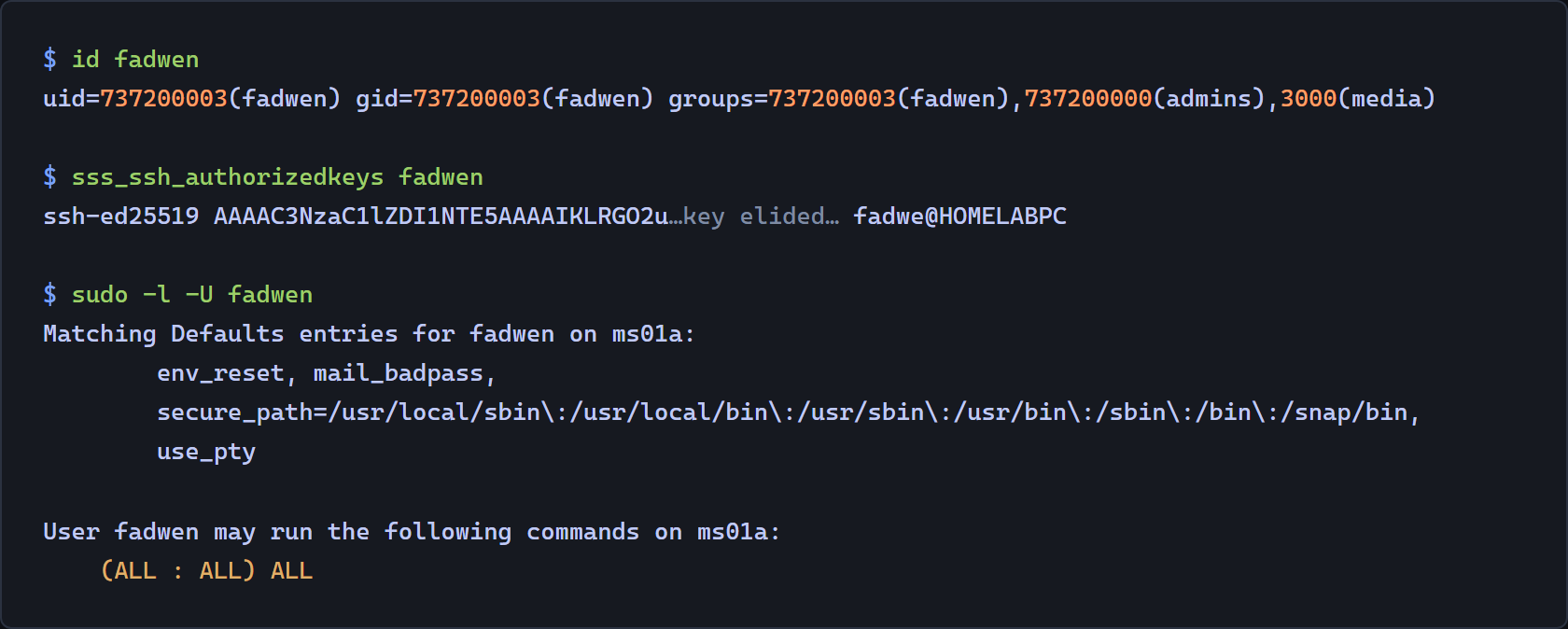
id and sudo -l are the pair that catch the two traps above. A user whose id output is missing a group has a name resolution problem, and a user with correct groups and no sudo rules has the sudo_provider problem or the sudo-rs problem, depending on the distro.
What is enrolled now
Seven hosts are in the realm: the NAS, the hypervisor, a handful of application VMs, and the thin client running the directory itself. Logging in gets me a ticket, my ssh key comes from the directory, my sudo rights come from the directory, and the share works because a group number matched.
The local break-glass accounts still exist on every host, with passwordless sudo, and they’re staying. A directory that can lock you out of the machines it manages needs a way back in that doesn’t involve the directory, and the first time the KDC is unreachable is the wrong moment to discover the design was pure.
The last post in the series covers the replica: running FreeIPA in a container because the only spare host was Ubuntu, why the image tag has to match a version number nobody thinks to check, and how to prove replication is working when the initial seed makes a broken agreement look healthy.
References
- sudo-rs is now the default sudo of Ubuntu 25.10
- Adopting sudo-rs by default in Ubuntu, Ubuntu Discourse
- Ubuntu 25.10 replaces sudo with Rust-based sudo-rs, including the LDAP sudoers note
- Solving the NFS 16-group limit problem, on
rpc.mountd --manage-gids - Auxiliary and supplemental groups with NFS, including the
mountdman page text - FreeIPA issue 7512, missing
python3-augeasdependency forfreeipa-client - Debian bug 770496, missing
python-pyasn1dependency forfreeipa-client