
In the last post I built and tested the firewall rules that keep my IoT VLAN away from the rest of the network. Among the few things those devices are allowed to reach is the Pi-hole at 192.168.66.2, and it’s the one I care about most, because DNS is where a smart TV tells you what it’s doing.
I noticed my Alexas making a lot of network traffic, which I narrowed down to Spotify continuously discovering playback devices. Then I went down the rabbit hole of what else on the network was doing the same.
Handing out Pi-hole as the DHCP DNS server isn’t enough on its own. Plenty of devices ignore DHCP DNS and talk to 8.8.8.8 or 1.1.1.1 directly, because a vendor decided its product shouldn’t depend on whatever you configured on your network. For those, the gateway has to step in and redirect the query. This post is the redirect, the proof that it works, and then the caveats: the encrypted DNS paths a port 53 redirect can’t touch, and what I’ve done about each.
One DNS server, no fallback
The IoT/Guest network’s DHCP configuration hands out one DNS server, 192.168.66.2. There’s no secondary. My Default LAN gets the same Pi-hole first and Tailscale’s MagicDNS resolver at 100.100.100.100 second, because machines on that network need tailnet names. IoT devices don’t.
Leaving the secondary empty is a choice, and it has a cost. If the Pi-hole goes down, every device on the IoT VLAN loses DNS. The alternative is worse. A secondary DNS server isn’t a backup that gets used only when the primary fails. Clients are free to use either address whenever they like, and some will spread queries across both or switch after a single slow response. A public resolver as the secondary means some fraction of IoT queries skip Pi-hole on a normal day, and the logs can’t show you which ones. One server, and if it’s down, I’ll know.
My Pi-hole was originally set up on a Raspberry Pi 3, running off its original SD card from 2019 or so. Moving it to a container on a more stable system, still physically separate from the main homelab stack, made sense for uptime.
Redirecting what didn’t ask
A device that hardcodes its resolver sends its query to, say, 8.8.8.8 on port 53. The packet leaves the IoT VLAN, hits the UDM Pro as the gateway, and would ordinarily be routed to the internet. The redirect is a destination NAT rule that rewrites that packet’s destination to 192.168.66.2 before routing happens.
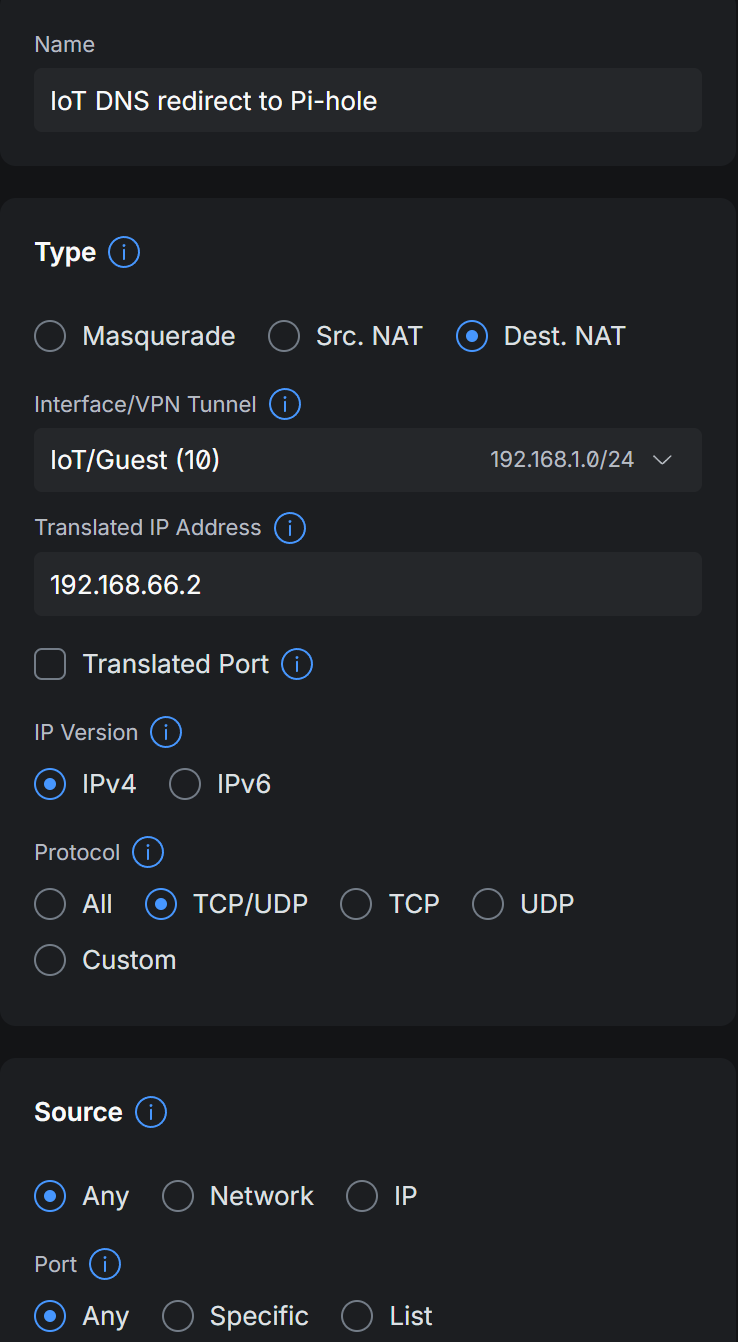
In UniFi’s NAT editor the rule reads: type Dest. NAT, interface IoT/Guest (that’s the VLAN the packet arrives on, so only IoT traffic is affected), translated IP address 192.168.66.2, protocol TCP/UDP, IPv4. Source is any. Destination is any address, port 53.
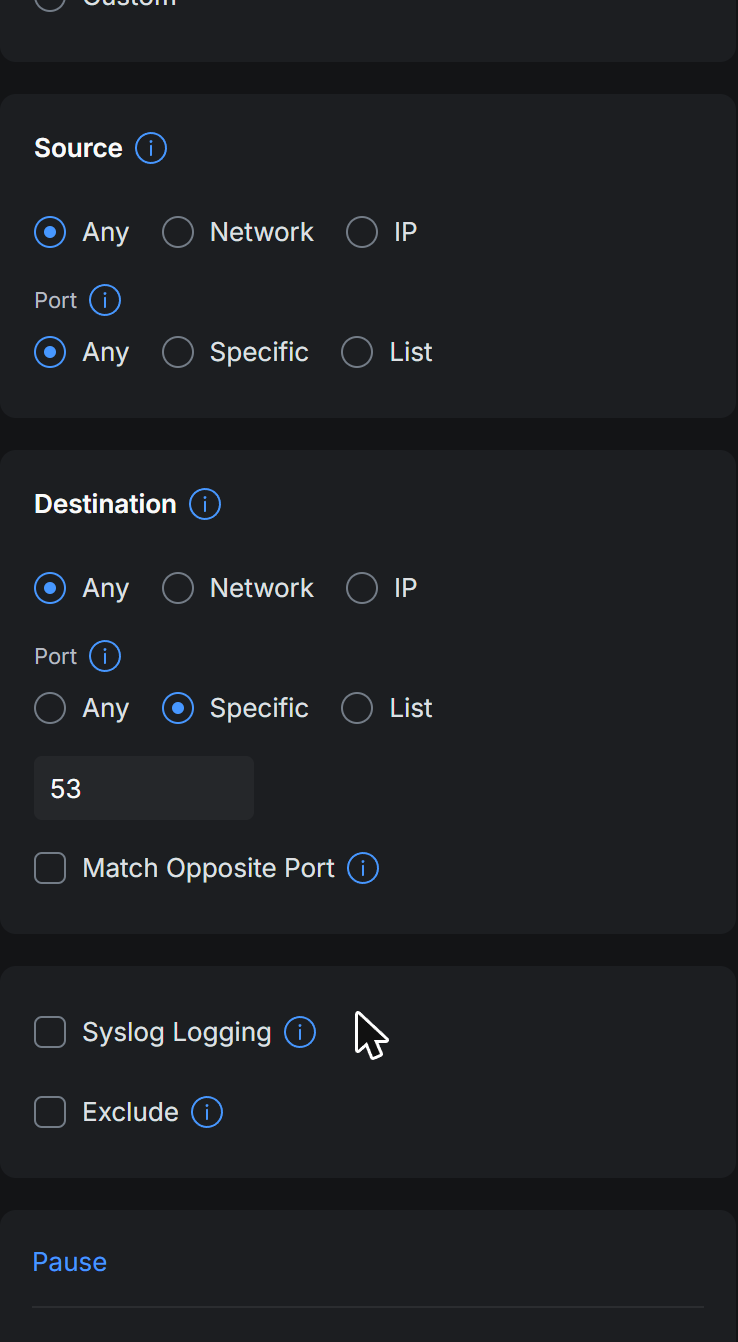
“Translated Port” is left unchecked, so the port stays 53 and only the address changes. The rule doesn’t mention the Pi-hole’s own traffic because Pi-hole is on the Default LAN, where this rule doesn’t apply. That’s the easy way to avoid the loop you’d get if the Pi-hole’s own upstream queries were redirected back to itself. Put the resolver on a network the redirect doesn’t cover.
The NAT rule changes where the packet goes. The firewall still has to let it through. In the policy list from the last post, “IoT to Pi-hole DNS” allows IoT/Guest to 192.168.66.2 on TCP and UDP 53, with return traffic allowed automatically. Because NAT rewrites the destination before the firewall evaluates the packet, a query that started out addressed to 8.8.8.8 arrives at the policy engine looking like a query to the Pi-hole, and that allow rule covers it. Without the allow, the redirect would steer the packet straight into “block iot to lan.”
Proving it
A NAT rule in a UI is a claim. To test it, send a query from inside the VLAN to a public resolver, for a name only your Pi-hole knows, and see who answers.
The test client is the same network namespace on my Proxmox host that the last post describes: a VLAN 10 subinterface, a DHCP lease, and commands run inside the namespace. From there:
| |
unifi is a local DNS record on my Pi-hole, pointing at 192.168.66.1. It exists because the UniFi power strip on the IoT VLAN asks for that bare name about ten thousand times a week looking for its controller. Google’s resolver has no idea what unifi is. If the query really reached 8.8.8.8, the answer would be empty.
| |
Only the Pi-hole could have given that answer. For a second check, I sent a query for a name nobody has ever asked for, so it would stand out in the log:
| |
dig reports SERVER: 8.8.8.8#53 in its output, because dig only knows where it sent the packet. Pi-hole’s query log for the test client tells the real story:
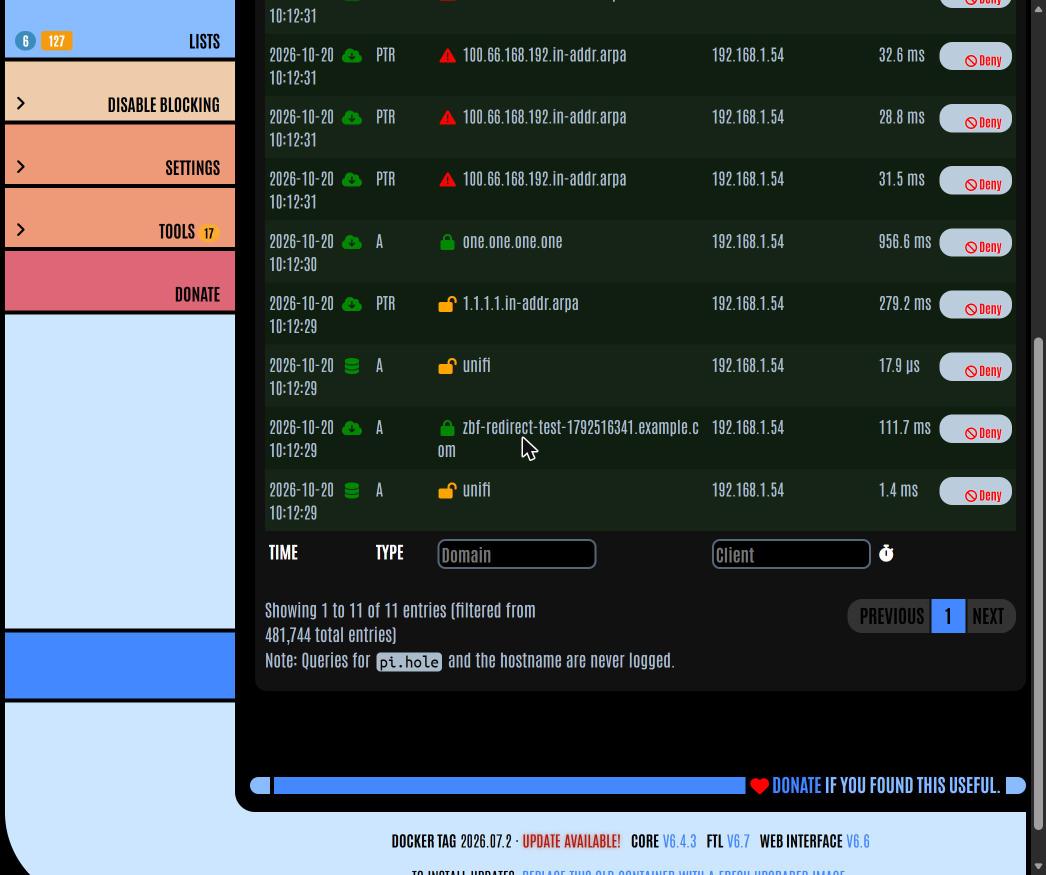
Every query the test client sent is there under 192.168.1.54, including the one addressed to 8.8.8.8. The unifi lookups show as cache hits. The test name was forwarded upstream and came back NODATA, the normal answer for an example.com subdomain.
That screenshot carries the argument. A device on the IoT VLAN can point itself at any resolver it likes, and Pi-hole still sees the query and gets to decide the answer.
Per-device lists for devices that need them
Getting every query to Pi-hole is half of it. The other half is doing something useful with queries from a Roku, whose needs differ from a laptop’s.
Pi-hole groups handle that. A client can belong to more than one group, and it gets the lists of every group you put it in. My estate-wide block list is small and conservative: I harvested the usual third-party lists, scored each domain by how many independent lists carry it, intersected that with what my network queries, and kept the dozen or so that were both contacted and unambiguous. Ad servers the Roku calls are left alone on that list, because ad-supported channels stop playing when their ad calls fail.
The Roku gets its own group. Those two devices are used for Plex alone, so no ad reaching them is ever wanted, and the Roku-specific list blocks Roku’s own logging and ad services plus the measurement hosts its home screen calls. The cameras have a group that denies one RDK telemetry host and leaves everything the cameras need to function. The monitor has a group for its Tizen telemetry.
All of that lives in files in my homelab repo, registered with Pi-hole as file:// adlists and scoped to a group each, with a script that syncs them. What bit me is in the comments at the top of the client list:
| |
Both traps are in those five lines of comment. A client has to stay in the Default group as well as its own. Pi-hole gives a client only the lists of the groups it belongs to, so moving a Roku out of Default to put it in the roku group would drop every estate-wide block and leave it less filtered than a device with no group at all. And every IoT client is keyed by IP address rather than MAC. Pi-hole learns MACs from ARP, and ARP doesn’t cross a subnet boundary. From the Pi-hole’s position on the Default LAN, an IoT device is just a source address, so its MAC is useless as a key.
Keying by IP means the group membership follows the address, and if you forget that, the lists drift. If the Roku’s lease expires and a camera picks up 192.168.1.133, the camera inherits the Roku’s block list and the Roku loses it, and no log line announces the swap. Each of those devices has a DHCP reservation in UniFi so the address stays put. The reservation is as much a part of the filtering as the list is.
I don’t know what Samsung does with its network discovery/telemetry, but the amount of it on my network was absurd. I hate “smart” TVs/monitors. /rant off
What port 53 can’t catch
Everything above assumes the device uses plain DNS on port 53. The two encrypted alternatives don’t, and they’re the reason “all IoT DNS goes through Pi-hole” needs an asterisk.
DNS over TLS runs on its own port, 853. A device that speaks DoT opens a TLS connection to 1.1.1.1:853 or 8.8.8.8:853 and sends its queries inside it. The port 53 redirect doesn’t see it. My first test from the VLAN found 853 open, and the last post has the block that closed it.
DoT has its own port, so it has a firewall answer. A device that tries DoT gets no connection and, if it’s built sensibly, falls back to plain DNS, where the redirect catches it. After the block went in, 853 to both public resolvers reported closed from the test client, and plain DNS still worked.
DNS over HTTPS is the harder one. DoH runs on port 443, the same port as every website, to the same kinds of addresses. There’s no port to block, and your gateway can’t tell a DoH query from a web request without inspecting TLS. A browser or device that uses DoH resolves names past Pi-hole entirely, and Pi-hole’s statistics can’t show the gap, because the queries don’t arrive.
What’s left is the bootstrap. A DoH client has to resolve the name of its DoH server before it can use it, and that first lookup is plain DNS. Chrome’s DoH bootstrap on this network is chrome.cloudflare-dns.com. Deny that name and Chrome can’t find its DoH endpoint, so it falls back to the system resolver. My Pi-hole carries one entry for this:
That comment is already out of date in one way, and the sync script’s manifest explains why:
| |
I’d originally scoped the DoH denial to one PC. The query log showed three other clients resolving the bootstrap name. That’s three other Chromes about to stop using Pi-hole. A per-device DoH block only protects the device it’s on. The list now applies to every client, including the IoT VLAN.
Firefox has a separate mechanism. It checks a canary domain, use-application-dns.net, and treats an NXDOMAIN or an answer with no records as a signal that the network’s resolver should be used instead of DoH. Mozilla’s own note is that the canary only applies when DoH is on by default; a user who turned DoH on by hand is left alone. I haven’t added the canary to my list, since there’s no Firefox on the IoT VLAN and it’s the Chrome bootstrap that showed up in the log.
I’m sure some of these smart devices are doing their own DoH. I don’t trust these corporations not to snoop around my network.
Devices with their own DoH client and a hardcoded server address skip even the bootstrap. For those, the answer is that there isn’t one at the DNS layer. They go on a VLAN where they can’t reach anything I care about. That’s why the IoT VLAN exists.
The network that bypasses all of this
There’s a third network on the UDM, a separate household network on its own VLAN, and its DHCP hands out no DNS server at all. Those clients resolve through the gateway, and the gateway forwards to the ISP. No Pi-hole, no redirect, no block lists. That’s the design. It isn’t my network to filter, and if a page fails to load there, the answer shouldn’t be “something on Jeff’s Pi-hole.” The DNAT rule is bound to the IoT/Guest interface, so it doesn’t touch that VLAN either.
What ended up where
The redirect itself is one NAT rule and one firewall allow, and the proof is one dig command and a screenshot of the query log. The rest of it, the DoT block, the per-device groups, the DHCP reservations and the estate-wide bootstrap denial, is what it took to make “every IoT query goes through Pi-hole” a claim I can back up. The Pi-hole lists are files in git, the NAT rule and firewall policy are recorded on the gateway’s inventory entry, and the test client takes thirty seconds to stand up. I can check the claim again any time a new device shows up on the VLAN. That happens more often than I’d like.
References
- Canary domain - use-application-dns.net, Mozilla Support
- Pi-hole group management, Pi-hole documentation
- UniFi zone-based firewall, Ubiquiti Help Center