
By the end of the previous post, seven hosts in the lab were authenticating against one Dell Wyse 5070 thin client. Every login, every sudo -l, every group lookup the NAS performs when somebody touches the media share, all of it resolved against a single machine sitting on a shelf.
That machine has been perfectly reliable. It’s also a thin client with a laptop-grade SSD in it, holding the only copy of a Kerberos realm, and the failure mode isn’t that logins get slower. The failure mode is that nobody can log into anything, including the machines I would use to fix it.
So the realm needed a second server. The obstacle was where to put it, because the only spare host I had was running Ubuntu, and freeipa-server isn’t packaged for Ubuntu at all. That constraint decided the shape of everything that follows: the replica runs as a container built from a RHEL-based image, on a Debian-derived host. It works, and it has a handful of sharp edges nobody puts in the quick-start.
What a replica is
A FreeIPA replica is a full peer. It carries its own copy of the directory, its own KDC, its own DNS, and optionally its own CA, and clients treat both servers as interchangeable. Multi-master replication moves writes in both directions, so an account created on the replica appears on the primary and the other way round. Nothing here is a read-only mirror.
Certain roles don’t work that way, and they’re the subject of the last section of this post. For the moment the useful mental model is two equal servers with a small number of jobs that only one of them does.
Putting one of those peers in a container is a decision with a consequence attached. The container is a complete host as far as IPA is concerned: it has a hostname, a host principal, a keytab and a full directory database, and all of that state lives in the ./data bind mount. Delete the container and recreate it and you have the same server. Delete ./data and you have destroyed a directory server, and the correct recovery is removing it from the topology on the primary before building a new one, because the primary will otherwise keep an agreement pointing at something that no longer exists.
The compose file
The replica lives at /srv/homelab/ipa-replica/ on the Ubuntu host:
| |
command: ipa-replica-install selects what the image does on first start. The same image installs a primary, a replica or a client depending on that line, and IPA_SERVER_INSTALL_OPTS carries the arguments through to it.
dns: [192.168.66.16] points the container at the primary. It has to resolve that name and find the realm’s SRV records under it before it can join anything. --setup-ca and --setup-dns ask for a replica that is a CA and a DNS server as well as a directory. A second answer for DNS and a second issuer for certificates is the point of building it, well beyond a second copy of the user list.
The IPv6 sysctl is there because IPA expects a working IPv6 loopback and Docker disables IPv6 in containers by default. The install fails without it in a way that reads like a networking problem on the LAN.
How clients find the second server
Nothing has to change on the seven enrolled hosts, and the reason is in the file that enrollment wrote:
| |
The _srv_ token tells SSSD to discover servers through DNS SRV records under the realm’s domain. A replica that sets up its own DNS publishes _kerberos._udp, _ldap._tcp and the rest of the family for itself as part of the install, so every client learns about it the next time it looks. Failover between them is SSSD’s job, and it happens without a restart.
The hostname after _srv_ is a fallback for the case where discovery itself fails. On a network where IPA serves the zone, that situation has already gone badly. Leaving it there costs nothing.
First run, and a secret that exists once
The Directory Manager password for the join is needed once, so it never goes into the compose file:
The ${IPA_REPLICA_PASSWORD:-} default in the YAML is what makes this work afterwards. The image entrypoint writes install options only while /data is unprovisioned. Once the replica is configured it ignores both PASSWORD and IPA_SERVER_INSTALL_OPTS entirely, so every later docker compose up -d runs fine with the variable unset and empty. The compose file is safe to commit, and the credential lived in one shell for one command.
systemd in a container, without privileged mode
FreeIPA runs a fleet of services under systemd, so the container runs systemd as PID 1. The common advice for that is --privileged, and upstream explicitly doesn’t support it. What the container needs instead is cgroup: host together with a writable bind mount of /sys/fs/cgroup.
The writable part is recent and catches people who followed older instructions. Every guide written before 2024 mounts that path read-only. That was correct under cgroups v1. Docker 25 made recursive read-only bind mounts the default, so a :ro mount now propagates read-only to everything underneath it, and systemd can’t create its own control group:
Exit 255 from PID 1, four lines of output, and nothing in the FreeIPA logs because FreeIPA never started. It looks just like a permissions problem, so the instinct is to reach for --privileged. That’s the wrong direction. Change the mount to :rw and it starts.
The install options also require --skip-mem-check. The installer reads available RAM to decide whether the machine can host a directory server, and inside a container it can’t see the cgroup memory limit, so it aborts with a complaint about being unable to determine available memory on a host with plenty of it.
An image tag that has to match a version nobody checks
This is the one that cost me some time, and I would tell anyone building a replica to read the next section before believing their own eyes.
My primary is Rocky 10 with IPA 4.13.1. The obvious first choice of image was the rocky-9 tag at the same IPA version, because IPA versions matching seemed like the thing that mattered. Both ends reported 4.13.1. It looked correct.
The version that has to match is 389-ds, and its major version specifically. Rocky 9 ships the 2.x series, Rocky 10 ships 3.x, and the two disagree about the wire format of the startReplication extended operation used to begin a replication session. The response one sends isn’t something the other can parse.
What that produces is a half-installed replica that reports success. The CA replication agreement builds correctly and stays healthy. The domain agreement fails, with this in the error log:
In 389-ds terms that message means a decoding error on the replication control received from the consumer. A version disagreement produces it, though the logs give you no help connecting the two.
Switching to an AlmaLinux 10 image, carrying the same 389-ds major as Rocky 10, fixed it. The IPA version in the tag was never the important part of the string.
The initial seed proves nothing
That failure mode generalizes past this one mistake, and the habit it produced is the thing I would keep from the whole build.
ipa-replica-install performs an initial total update, a bulk copy of the database, before incremental replication starts. That seed completed fine in the broken configuration, because it doesn’t use the mechanism that was failing. The replica therefore came up holding every user, every group, every host and every DNS record. Logging in against it worked. ipa user-find returned the right people. dig against it answered correctly for the whole zone.
All of that is compatible with a replica that hasn’t received a single update since the moment it was built. Checking whether the data is present tells you about the past and nothing about whether the link is live.
The check that means something is a write on one side and a read on the other:
Run it in both directions, then delete the attribute and confirm the deletion arrives too. Additions and deletions travel by different paths often enough that testing only one leaves half the mechanism unverified.
One small thing that wasted a couple minutes of that evening: docker exec needs -i when you feed it a heredoc. Without it the standard input is discarded, the command runs against nothing, and the write you thought you made never happened, which is indistinguishable from replication being broken.
Unsticking an agreement
When an agreement has failed and you have fixed the underlying cause, it doesn’t always resume on its own. A total update restarts it, and this can be done as Directory Manager over the local socket with no admin credential:
Note the escaping in the DN. The suffix dc=homelabdomain,dc=xyz appears inside an RDN value, so the equals signs become \3D and the comma becomes \2C. Getting that wrong produces a “no such object” that looks like the agreement is missing.
Where the uid numbers come from now
Post one mentioned that FreeIPA assigns POSIX ids out of a random 200,000-wide range picked at install. With two servers there is a second question: how do two directory servers hand out numbers from one range without ever colliding?
The answer is the DNA plugin, for distributed numeric assignment. The range gets carved into per-server chunks, each server allocates only from the chunk it holds, and a server running low asks its peers for more. Nothing is centralized and nothing collides.
| |
That prints the range each server currently owns. The reason to look at it before you need to is that removing a server from the topology without transferring its range strands those numbers, and a lab that gets rebuilt a few times can end up with most of its id space owned by machines that no longer exist.
The topology itself is directory data, so it’s queryable:
Two segments, one for the domain suffix and one for the CA. Those are the two that failed independently earlier in this post.
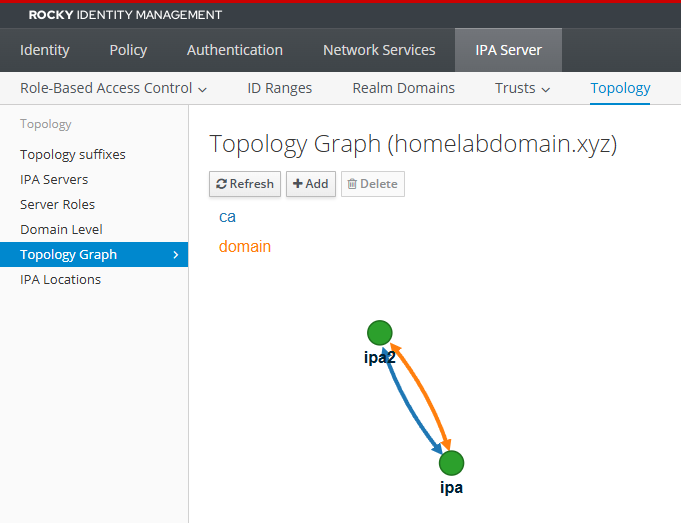
The web UI draws the same information as a graph under IPA Server, Topology, and that graph is the fastest way to see a two-node topology that has become a one-node topology with a spare attached.
Giving the replica its own address
The replica is a separate IPA host and wants ports 53, 80, 443, 88, 389, 464 and 636. Its own host already uses several of those, so port mapping was never going to work. It needs a real address on the LAN, and the lan-svc macvlan network in the compose file provides one.
Macvlan has a property that surprises people the first time: a host can’t reach its own containers on a macvlan network. Traffic between the parent interface and a macvlan child never reaches the wire, and the kernel drops it. The Ubuntu box was running the replica and couldn’t query it, which is an awkward position for a machine that is also enrolled in the realm.
A shim interface fixes it. Create a macvlan interface on the host itself, give it an address, and route the container’s address through it:
That doesn’t survive a reboot, so it becomes a systemd unit. If you would rather dedicate a second physical NIC to the containers, take the IP address off it first with nmcli con mod <con> ipv4.method disabled. With two NICs holding addresses on the same subnet and the default arp_ignore=0, either interface will answer ARP for either address, and the separation you think you built is decorative.
Test the result from a third machine. Measuring from the container host proves nothing, because macvlan-to-macvlan traffic on one parent is switched internally and never touches the network you are trying to verify.
Checking the whole thing
Run on both servers, and treat a difference between them as a finding:
| |
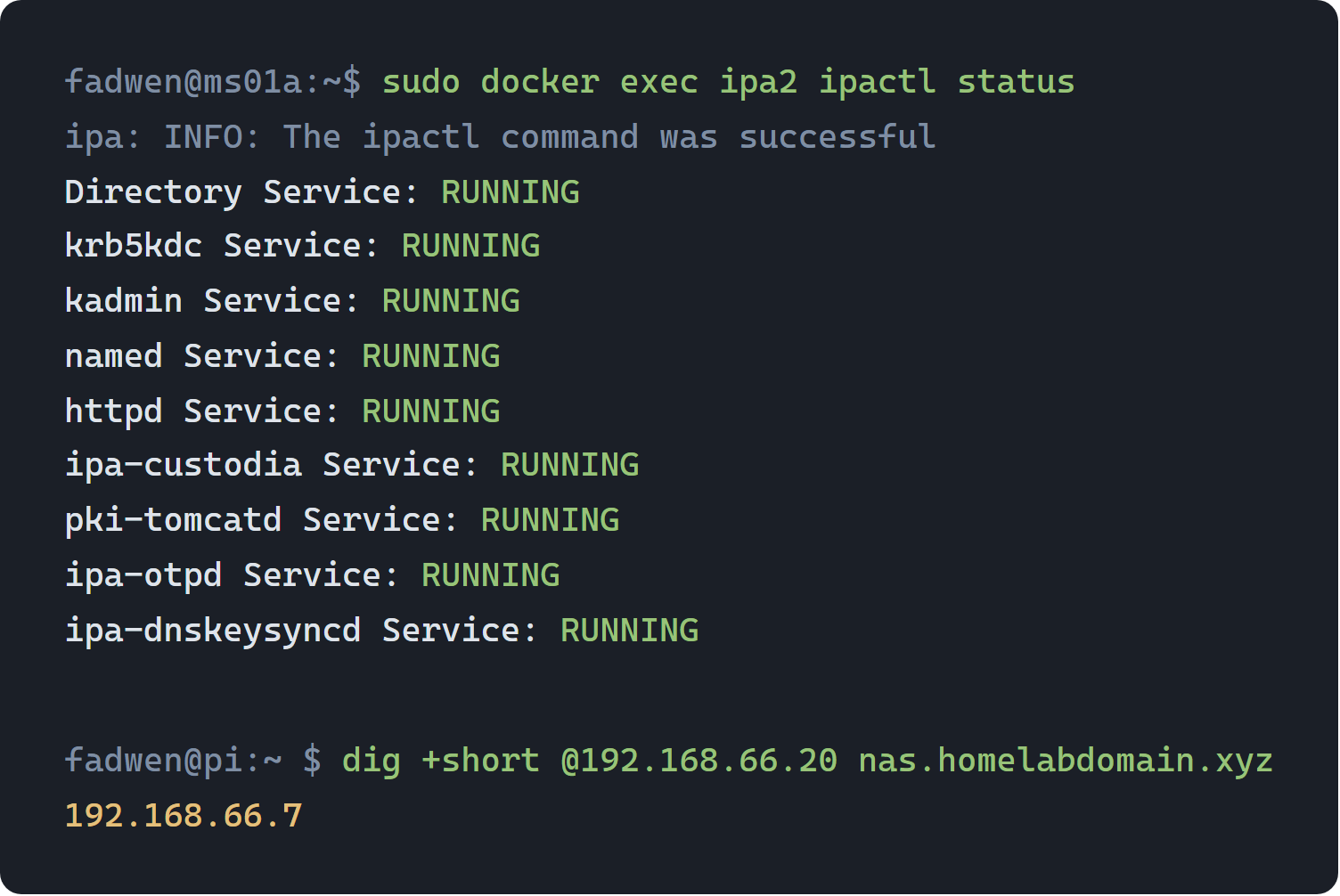
Then add the replica as a second conditional forwarder on Pi-hole, so name resolution for the internal zone stops depending on one machine as well:
What clients do when a server disappears
Two servers only help if the clients handle the switch, so it helps to know what the failover looks like from the client side before you ever test it.
SSSD keeps a list of discovered servers and marks one as current. A request that fails or times out against the current server promotes the next one, and the daemon retries discovery periodically after that, so a server coming back gets picked up without intervention. None of this involves restarting anything on the client.
Below that, SSSD has an offline mode. When no server answers at all, it serves what it has cached: the identity of users who have logged in before, their groups, and their credentials if cache_credentials is enabled. A user who has never logged into that host is unknown, because there was never anything to cache. That distinction is the whole shape of a directory outage in practice. Familiar users on familiar machines keep working, and everything else stops.
Kerberos tickets have their own timeline. An existing ticket stays valid until it expires, so a session that already holds one survives the KDC going away for as long as the lifetime allows. Obtaining a new ticket requires a KDC to be reachable, so the failure surfaces at the next login and not at the moment the server goes down. An outage discovered that way looks like it began an hour after it did.
Losing a server, planned or otherwise
Post two ended on ipa-backup and its constraint: a backup restores only onto a host with the same name, address and IPA version. A second server changes that calculus more than another copy of the data suggests.
With two servers, the recovery for a dead machine isn’t a restore at all. Build a new host, join it as a replica, and let replication populate it from the survivor. The name can differ. The IPA version can be newer. Nothing depends on a backup file taken before whatever broke.
What that path does require is cleaning up after the machine you lost:
| |
That removes the server from the topology along with its replication agreements, its DNS records and its principals. Skipping it leaves the survivor holding an agreement pointing at a host that will never answer, and a replication error that repeats in the logs for as long as you leave it. Rebuilding a replica under the same hostname without deleting the old entry first is the usual way people end up with a topology that refuses to converge.
ipa-backup still earns its timer. It covers the case where the damage replicates, a deletion or a bad change that both servers agree on and neither can undo. Redundancy protects you from a machine dying. Backups protect you from your own commands.
What is still outstanding
Writing the unfinished parts down is more use than pretending the build is complete.
Some roles live on one server and do not replicate
The caRenewalMaster role, CRL generation and the DNSSEC key master all sit on the primary. Each is a job a single server in the topology performs, and none of the three moves on its own when that server stops answering.
The renewal master is the consequential one. It renews the CA subsystem certificates for the whole topology, so losing it permanently means certificate renewal stops, and the first evidence you get is an expired certificate somewhere unrelated months later. Moving it is one command:
| |
CRL generation moves with ipa-crlgen-manage enable on the new host and disable on the old one, and running it on two servers at once is its own kind of mess.
The commands exist, they’re short, and I haven’t rehearsed any of them against a server that is really gone. Knowing the command isn’t the same as having done it under the conditions where you would need it, and that gap is where this part of the build stands.
Break-glass accounts still hold passwordless sudo
Every host has a local account outside the directory that can get in when the directory can’t answer. I left that hole in the design on purpose, and it stays.
What the second server bought
The realm now has two KDCs, two DNS servers for the internal zone and two CAs, one of them on a thin client and one in a container on a NAS-adjacent Ubuntu box, which is an arrangement no vendor documentation will ever describe.
Building it taught me more about 389-ds than the primary install did, mostly because the primary install works when you follow the steps and the replica doesn’t tell you when it has half worked. Across these three posts, the lesson I keep relearning sits in the middle of this one: a system that reports success on work it finished before reaching the broken part has told me nothing, and the only test that counts exercises the mechanism I depend on.
References
- freeipa-container issue 582, read-only cgroup mount and exit code 255 under Docker 25
- freeipa/freeipa-container, the upstream image repository
- 389 Directory Server replication agreement status messages
- ipa-replica-manage and topology management in FreeIPA