
Everything in this series so far has been reachable only from my own network. Certificates for names that resolve nowhere public, forward auth behind an allowlist that drops anything from outside my LAN. That’s a comfortable place to stop, and I didn’t stop there, for a reason that has less to do with remote access than you might expect.
The plan for this stack is OIDC between authentik and some apps. Forward auth is the fallback for applications that can’t do better, and a good number of the things I run can: they speak OpenID Connect properly and would redirect a user to an identity provider rather than have a proxy assert a header on their behalf. OIDC is the better integration, and the series ends up there.
OIDC only works if the identity provider is reachable. The browser being redirected has to reach it, and depending on the flow so does the application doing a token exchange. The moment any of that involves something outside my house, an identity provider that only answers on 192.168.66.0/24 becomes a local curiosity.
So auth had to become public. This post is what that cost, what I put in front of it, and why the access policy covers far less of the identity provider than you would expect.
Choosing a tunnel over a port forward
The obvious way to make something on your network reachable is to forward a port on your router. It works, it’s free, and most people do it first.
A Cloudflare tunnel inverts the direction. Instead of opening a port and waiting for the internet to connect inward, a daemon on your machine dials outward to Cloudflare and holds those connections open. Requests arriving at Cloudflare’s edge for your hostname get handed down the connection that is already established. There’s no inbound rule, no forwarded port, and your public address is never in DNS.
Your WAN address stops being a target. Nothing about the arrangement advertises where you live on the internet, and a scan of your address finds a closed port. If your address changes, nothing breaks, because nothing was pointing at it.
The listening socket is on Cloudflare’s side. Anything hostile arrives at their edge and is subject to whatever they do about it before it becomes your problem. That moves real risk off my network. It also creates a dependency, which I come back to at the end.
On a home connection what decides it is that a tunnel works when your ISP doesn’t cooperate. My inbound port 80 is blocked, which is why my certificate setup looks the way it does. An outbound connection isn’t something my ISP has an opinion about.
Protection a homelab cannot build
Start with the physics. If somebody points a denial of service attack at a home connection, no amount of software on your side helps. Your firewall can drop every packet perfectly and you’re still offline, because the packets already used up the link before your firewall saw them. The saturation happens on the segment between your ISP and your house, and there’s nothing you can install on the far end of a full pipe that unfills it. Filtering has to happen upstream of the bottleneck or it doesn’t count.
Cloudflare’s layer 3 and 4 mitigation absorbs DDoS attacks across its anycast network, with no per-gigabyte charge for attack traffic, on every plan including the free one. A tunnel sharpens it further: with no forwarded port and no public record pointing at my address, there’s no origin to aim at in the first place. The attack surface becomes a network built to absorb attacks.
The rest is smaller, and the free tier gives you a slice of it:
| Protection | On the free plan |
|---|---|
| Layer 3 and 4 DDoS mitigation | Unmetered, always on, no configuration |
| Managed WAF ruleset | A basic ruleset only, full OWASP coverage is paid |
| Custom firewall rules | Five |
| Rate limiting rules | One, and unmetered since 2022 |
| Bot filtering | Bot Fight Mode, the more capable modes are paid |
| TLS termination and certificate management | Included |
| Analytics retention | 24 hours |
Bot Fight Mode challenges traffic that is obviously automated. A public hostname doesn’t have to be interesting to attract constant scanning; it only has to exist. Knocking that noise down before it reaches the tunnel means my logs describe my traffic. That’s a legibility win more than a security one, and I would take it on those terms alone.
These protections cover what goes through Cloudflare and nothing else. Anything you expose by another route, a forwarded port on a different hostname, a service someone opened for a weekend and forgot, sits outside all of it.
Cloudflare terminates TLS. Requests are decrypted at the edge, inspected, and re-encrypted down the tunnel. That’s how the WAF can inspect anything at all, and it means Cloudflare can see plaintext for everything passing through, including credentials submitted to my login page. Choosing this is choosing a party to trust with those credentials.
Twenty-four hours of analytics retention is thin for investigating anything. By the time you notice a pattern, the evidence for it may already have aged out. (That’s within Cloudflare itself, and I may write about another approach in this ever-growing series.)
None of that changes the calculation for a homelab. It does narrow the claim: what Cloudflare gives me for nothing is the class of protection I couldn’t build myself, plus a useful fraction of the class I could.
Running cloudflared
| |
Compare the capability block to the Caddy service from the certificate post. That one needed cap_add: NET_BIND_SERVICE, because binding port 443 requires it. This one drops every capability and adds nothing back, because it never binds a privileged port. It never binds a port at all. That asymmetry is the tunnel’s security argument in one line of YAML: a process that only makes outbound connections needs less power than one accepting inbound ones.
--no-autoupdate is here for the reason the first post gives.
depends_on with condition: service_healthy stops the tunnel registering with Cloudflare and accepting requests for a service that is not up yet. Without it, a visitor gets a Cloudflare error page with nothing from your stack behind it.
Where the configuration lives
TUNNEL_TOKEN means this is a remotely managed tunnel. The daemon authenticates with the token and is then told what to do over its control connection. The routing rules live in Cloudflare’s dashboard, with no file on my host.
You can watch it happen in the logs at startup:
One hostname to one service, and a catch-all returning 404.
The catch-all decides what happens to a request arriving at the tunnel for anything else. Ingress rules are evaluated in order and the last one has to match everything, so http_status:404 is the right answer there. The tempting alternative, a bare service pointing at your application, turns the tunnel into an open door for any hostname anyone can get to resolve at Cloudflare.
The tradeoff of remote management cuts both ways. Against it: the routing lives outside my repository and outside version control, visible on the host only in a log line. My compose file is fully reproducible and my tunnel configuration is not. In its favor: there’s no config file to keep in sync, no reload to orchestrate, and changing a route doesn’t require touching the machine. A local config.yml with a credentials file is the alternative if you want the routing in git, and for a single hostname the extra moving parts cost more than they return. For anything with more than a handful of routes I would probably reverse that.
Note the upstream, too: http://server:9000. The Compose service name again, plain HTTP over the Docker bridge, the same way Caddy reaches it. The tunnel doesn’t go through Caddy at all. auth.homelabdomain.xyz has no site block in my Caddyfile and doesn’t need one, because TLS terminates at Cloudflare’s edge and the last hop is a container talking to a container.
Scoping the access policy
Cloudflare Access sits at the edge, in front of the tunnel, and decides whether a request may proceed at all. A request that fails never reaches the tunnel, so it never reaches my house. Mine uses a one-time PIN: you give it an email address, it sends a code, you enter the code, and Cloudflare issues you a session.
The obvious move with a tool like that is to put it in front of the whole hostname. Nothing reaches authentik until Cloudflare has established that the requester controls one specific mailbox, two independent systems both have to let you through, and the identity provider gets a second lock on its front door.
For an identity provider that doesn’t work, so I built something narrower. The application looks like this:
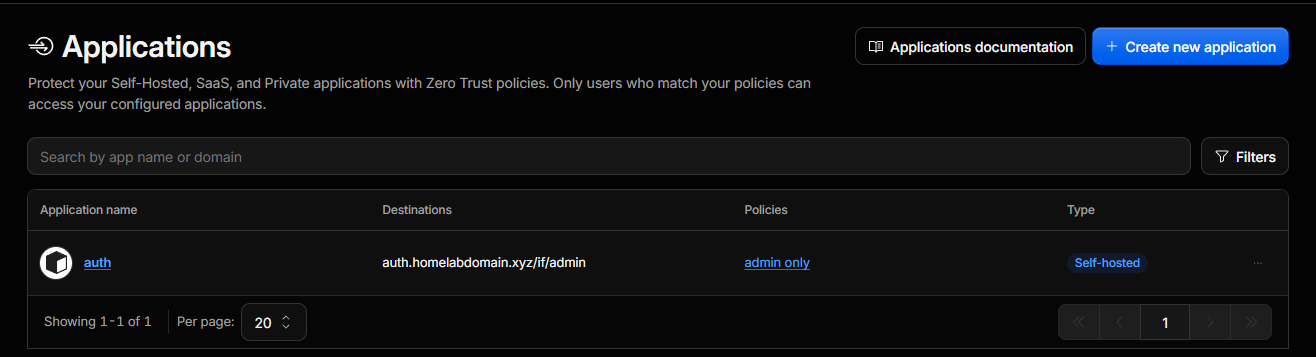
The destination column carries it, though the editor shows it more clearly, with the hostname and the path as separate fields:
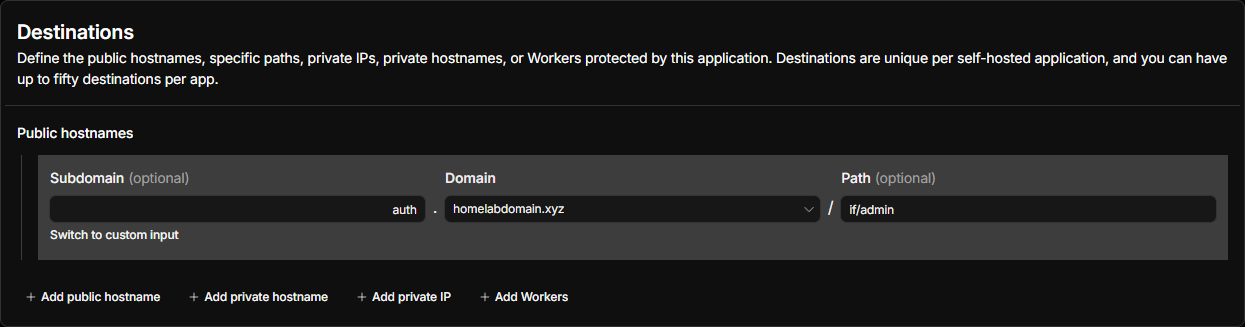
Written out:
| Field | Value |
|---|---|
| Type | Self-hosted |
| Subdomain | auth |
| Domain | homelabdomain.xyz |
| Path | if/admin |
| Policy | one rule, allow |
| Session duration | 1 month |
| Identity providers | accept all available, which with none configured means one-time PIN |
The destination is a hostname and a path. Access evaluates auth.homelabdomain.xyz/if/admin and stops there. The login flow, the OIDC endpoints, the outpost paths and the API all sit outside the policy, reachable from the internet without a PIN.
That looks like an oversight and is the opposite of one. It follows from the constraint that separates an identity provider from every other thing you put behind Access:
An identity provider cannot be blanket-protected, because being reachable is its job.
Work through what a blanket policy would break. A browser being redirected to log in has, by definition, not logged in yet, so it can’t present a session your identity provider issued. Put a challenge in front of the login page and the redirect lands on a Cloudflare prompt where your sign-in form should be. An OIDC client performing a token exchange is a server with no mailbox to receive a PIN at. The forward auth outpost endpoints from the last post exist to be called without a session. Every one of those paths has to answer unauthenticated requests correctly, or the protocol stops functioning.
The protectable surface is therefore the administration interface, the one area no protocol touches. /if/admin holds every high-value action, and no OIDC flow, outpost or token exchange ever reaches it.
That turns the design from a gap into a division of labor. Cloudflare Access guards the console. authentik guards itself, with its own flows, its own policies, and whatever MFA I bind to them. No proxy sitting in front of it can do that job on its behalf, and the two systems end up protecting different things without either one backstopping the other.
It also raises the stakes on authentik’s own configuration. The login page is on the internet. Its defense is the flow I configured. Misconfigure a stage or leave a weak password policy in place and nothing else is covering for you, so the authentication flow is where the care has to go.
The long way round
The session lasts one month. I picked that for a lab where nothing behind the console is critical, and it would be the wrong number somewhere it was.

Because auth.homelabdomain.xyz resolves through public DNS to Cloudflare, a browser on the same switch as the server doesn’t talk to the server when it visits that name. It goes out to my ISP, reaches Cloudflare’s edge, and comes back down the tunnel. The request starts and ends about fifteen feet apart and travels several hundred miles in between.
For the login flow that is mostly invisible, because the round trip is fast and the redirect is a page load. For the admin console behind Access it means an internal administrative session depends on my internet connection and on Cloudflare being up, and a month of session duration keeps that from becoming a daily irritation. A month is also how long a stolen Access session cookie stays useful. Somewhere with real consequences behind the console, a day would be the defensible number.
The forward auth path doesn’t hairpin at all. Following my previous posts in this series, those subrequests go to the per-application hostnames on 192.168.66.6, reached by IP with the name carried only in SNI, which is why those endpoints exist and why none of those names needs a DNS record. Every authorization decision for every service behind the proxy happens without a packet leaving the building, which was the point of setting it up that way. An internet outage costs me a slow login to one hostname rather than every service at once.
What hairpins is browser traffic to auth itself: the login page a redirect lands on, and the admin console. Even that has a direct route, because the first post bound authentik’s ports to the LAN address. Reaching the server on its own address works from inside, at the cost of the self-signed certificate warning covered in part two, which is the correct trade for a break-glass path and a bad one for daily use.
A local DNS override pointing the name at the host is a third option, and I haven’t taken it. It would mean the name resolves differently depending on where you’re standing, and for the component everything else depends on I would take one answer that is occasionally slow over two answers that are occasionally different.
Thirty-one hours on three connections
When cloudflared starts it doesn’t open one connection. It opens four, across at least two of Cloudflare’s data centers, so that any single connection or location failing doesn’t take your service down.
That redundancy works. Four connections over a recent two-day window:
Connection 2 failed at 04:04 on the second, and then failed again, and again, on a backoff, for thirty-one hours. It logged 225 serve errors against a single edge address before registering cleanly at 11:26 the following day. Connections 0, 1 and 3 were healthy throughout, and every request I made was served by one of them.
High availability converts outages into degradation, and degradation is silent by construction. A four-connection tunnel running on three behaves identically to one running on four, right up until the number reaches zero.
| |
Wildly uneven counts mean one connection is having a much worse time than the others. I run it when I’m already poking at the box for something else.
The balance
This hostname is now reachable from anywhere without a forwarded port, without anything listening on my public address for it, and with a daemon that holds no Linux capabilities at all. The administration interface sits behind an independent authentication system, and the parts the protocols require to be open are open on purpose.
The cost is a dependency. The tunnel is the only path to that hostname, so Cloudflare being unreachable means the identity provider is unreachable from the internet, and logging in from inside the house gets awkward until you fall back to the host’s own address. Everything already running survives: forward auth stays on the LAN, services behind the proxy keep authenticating people whose sessions are live, and a home internet outage doesn’t take the whole stack down with it. For a homelab that is a comfortable place to land. It’s a different calculation if anything you can’t afford to lose depends on new logins succeeding.
None of this puts a second lock on the identity provider’s front door. It puts a lock on the office at the back and leaves the front door defended by authentik, whose job that is.
Get it
The Compose stack, including the cloudflared service above, is in my TechbyJeff repo at Docker/authentik/docker-compose.yml. The tunnel token lives in .env, which isn’t in that repo and shouldn’t be in yours. The ingress rules and the Access policy aren’t files at all: they live in the Cloudflare dashboard, which is the tradeoff described above.
Sources
- Cloudflare Tunnel documentation
- Cloudflare: DDoS protection
- Cloudflare: WAF managed rules and plan availability
- Cloudflare: rate limiting rules
- Unmetered rate limiting for self serve customers, Cloudflare blog
- Cloudflare Access: self-hosted applications
- Cloudflare Access: one-time PIN
- authentik: OAuth2 and OIDC provider
Part four of a series on the identity stack in my homelab. Earlier: deploying authentik, certificates, forward auth. Still to come: the two applications that fought back, Tautulli and OpenMediaVault, then Proxmox over OIDC.